


 RAMS PDKS
Monday morning at the construction site's main entrance. A new subcontractor team is starting work; cards in hand, they are standing in front of the turnstile. At the same time, the card of a worker from another company who left last week is still defined on some of the devices on site. Both situations stem from the same problem: the card does not move at the same speed as the person's record.
At RAMS Türkiye's construction sites, hundreds of workers from dozens of subcontractors work alongside the permanent team. Knowing who enters and leaves the site, and when, is critical both for occupational safety and for subcontractor progress payments. In this article, we follow a card's journey in RAMS PDKS, from the turnstile to the progress payment report at the start of the month.
The project in brief
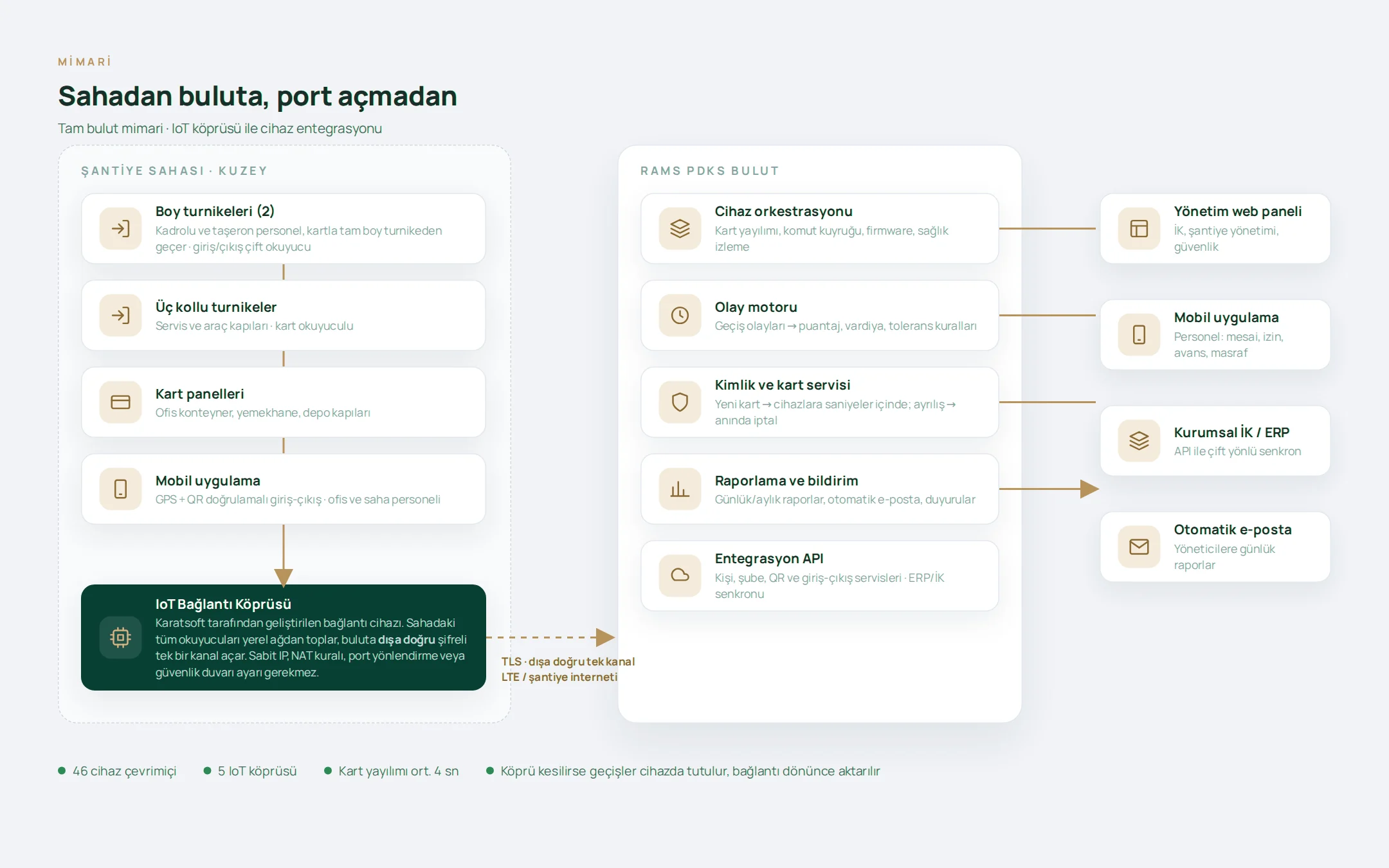
RAMS PDKS is a fully cloud-based time and attendance and human resources platform that centrally manages the entries and exits of permanent and subcontractor staff at RAMS Türkiye's head office, sales offices and construction sites. On site, staff pass through turnstiles with their cards, and in the offices through card reader panels; field and office staff can also use the mobile app with QR and location verification. The devices on site are connected to the cloud without opening ports, through the IoT gateway developed by Karatsoft. The employee list, card and device management, person groups, shifts, leave, subcontractor tracking, reports and automated report emails are all brought together in a single panel.
The card is at the turnstile in seconds, not hours
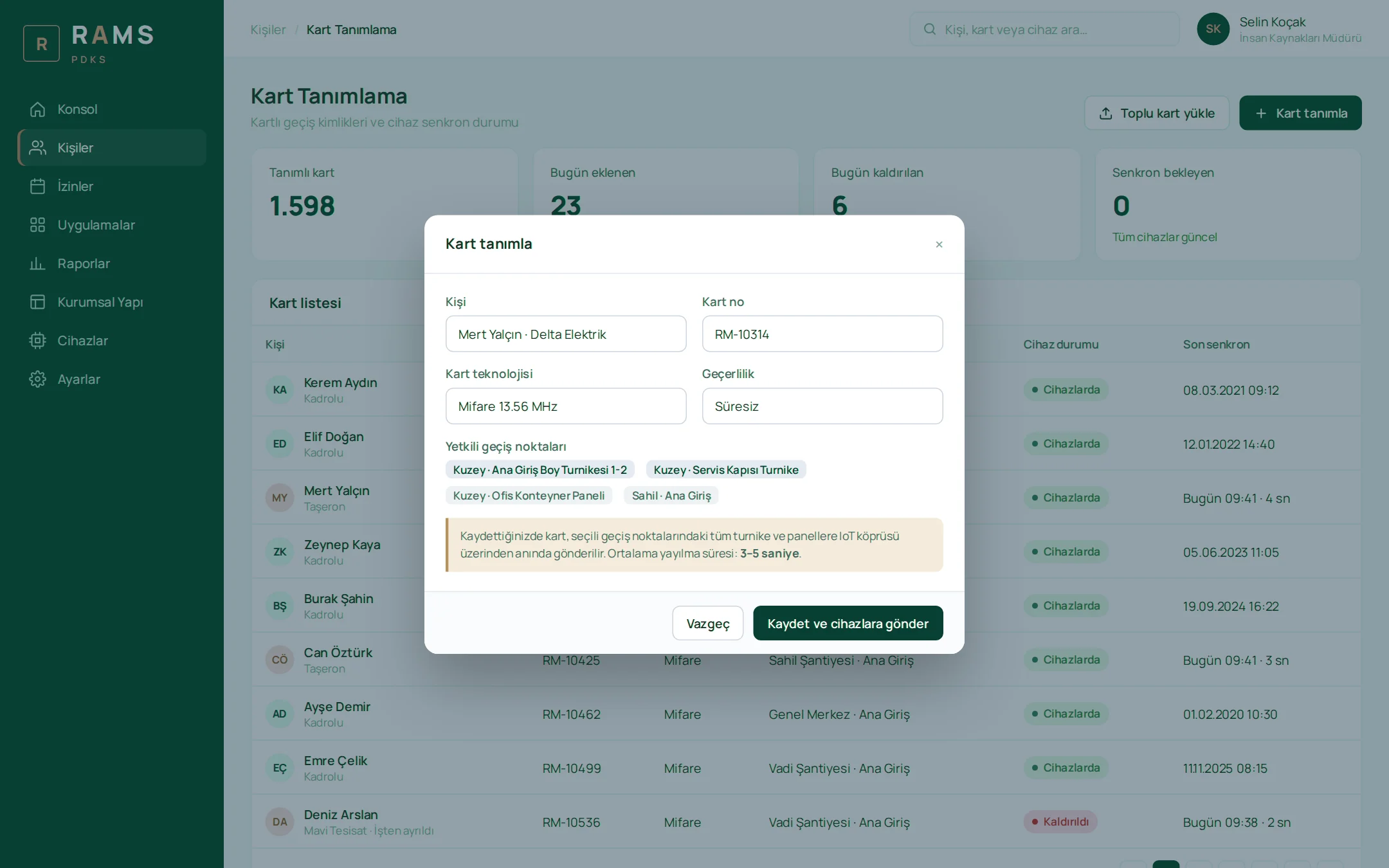
In the old setup, activating a newly arrived subcontractor worker's card could take hours, and cancelling the card of someone who had left could sometimes take days. The reason was simple: subcontractor turnover was high, dozens of new cards were issued and dozens cancelled every week, and cards were loaded onto each device one by one. This took time and also left the cards of departed staff active on site.
In RAMS PDKS, as soon as a card is enrolled for a person and their authorized access points, it is sent to all turnstiles and panels at those points. The card list shows each card's status on the devices and its last sync time; whether a card has reached the site is not guessed but read on screen. When a termination or deactivation is recorded, the card is removed from the devices just as quickly, within seconds. Closing the card is no longer a separate task but the natural result of recording the departure.
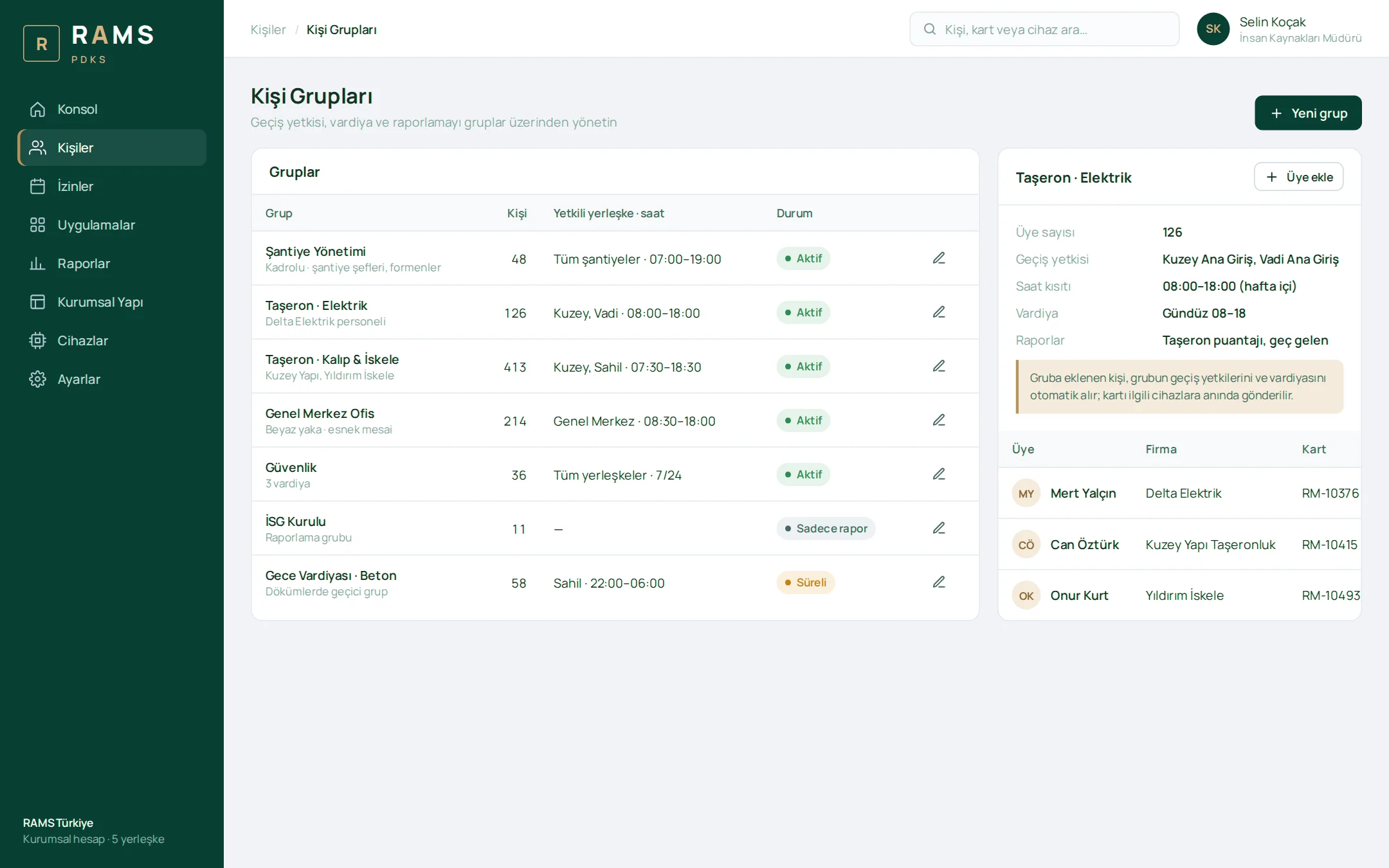
Instead of distributing permissions to individuals one by one, person groups are used. Access permissions, time restrictions, shifts and reporting are defined through groups; a person added to a group automatically receives the group's permissions and shift, and their card goes to the relevant devices instantly. When a subcontractor team arrives all at once, or finishes its work and leaves, employees can be activated or deactivated, updated or assigned cards in bulk.
Every subcontractor worker is created together with their company
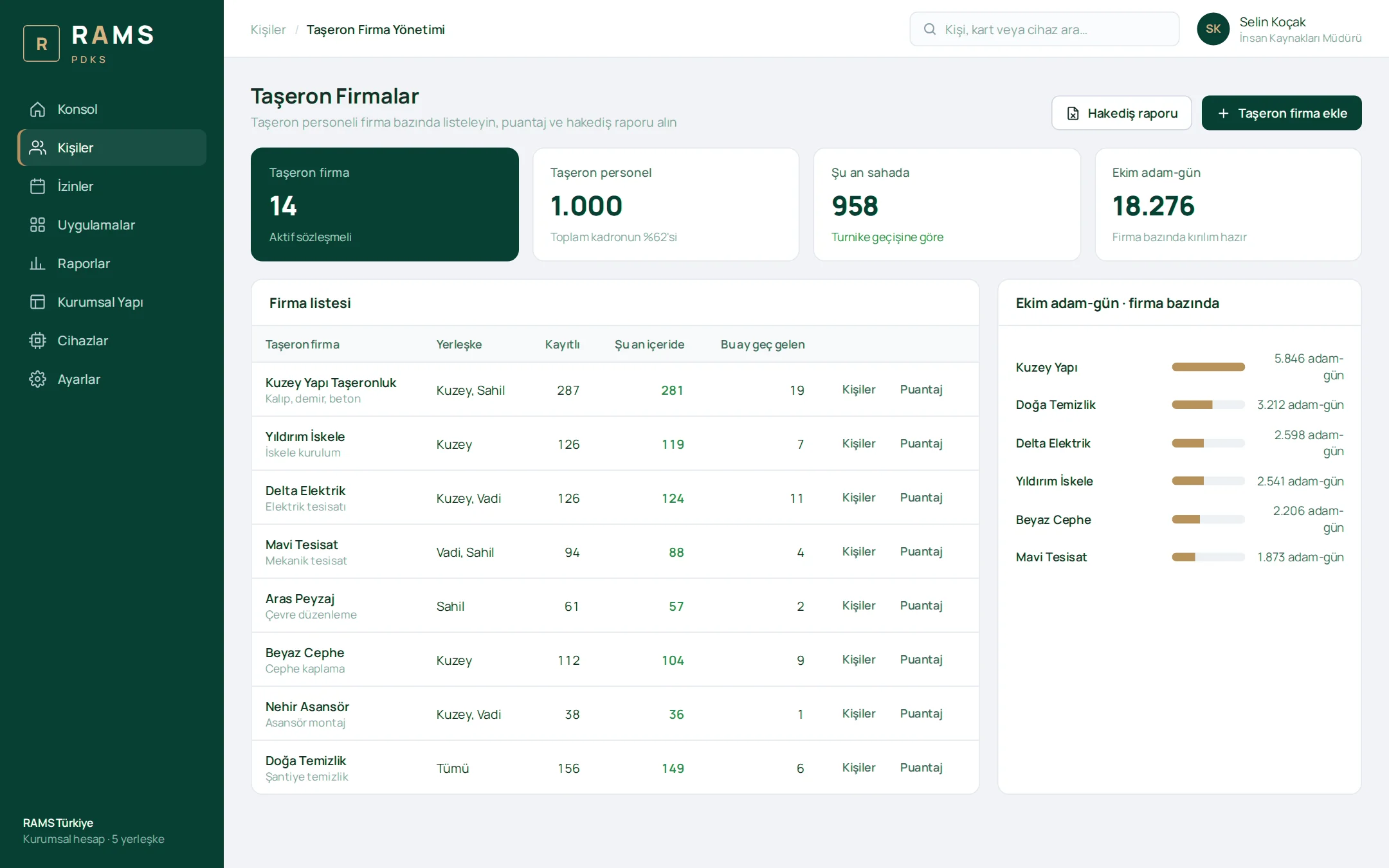
Permanent and subcontractor staff pass through the same gate but follow different rules. That is why we designed subcontractor information not as a column sitting in lists, but as a dimension that applies throughout the system. Each subcontractor worker is created under their company; the employee list, daily reports and the detailed monthly report are filtered and broken down by company. A separate time restriction for subcontractor staff can also be defined in the site settings.
Starting the system fully populated on day one also relied on this model. Branch, department, position and person records kept in Excel spreadsheets of different formats were imported with the field-mapping wizard, and rows with the subcontractor column filled in were automatically linked to the relevant company.
On the Subcontractors screen, each company is listed with its registered staff, the people currently on site and its monthly late arrivals; one click takes you to the company's person list, timesheet and man-day report. The monthly man-day report is exported directly to Excel for progress payments. The subcontractor supervisor role sees only the staff of its own company; construction site management sees its own site, and HR the entire organization.
The report arrives in the morning without anyone asking for it
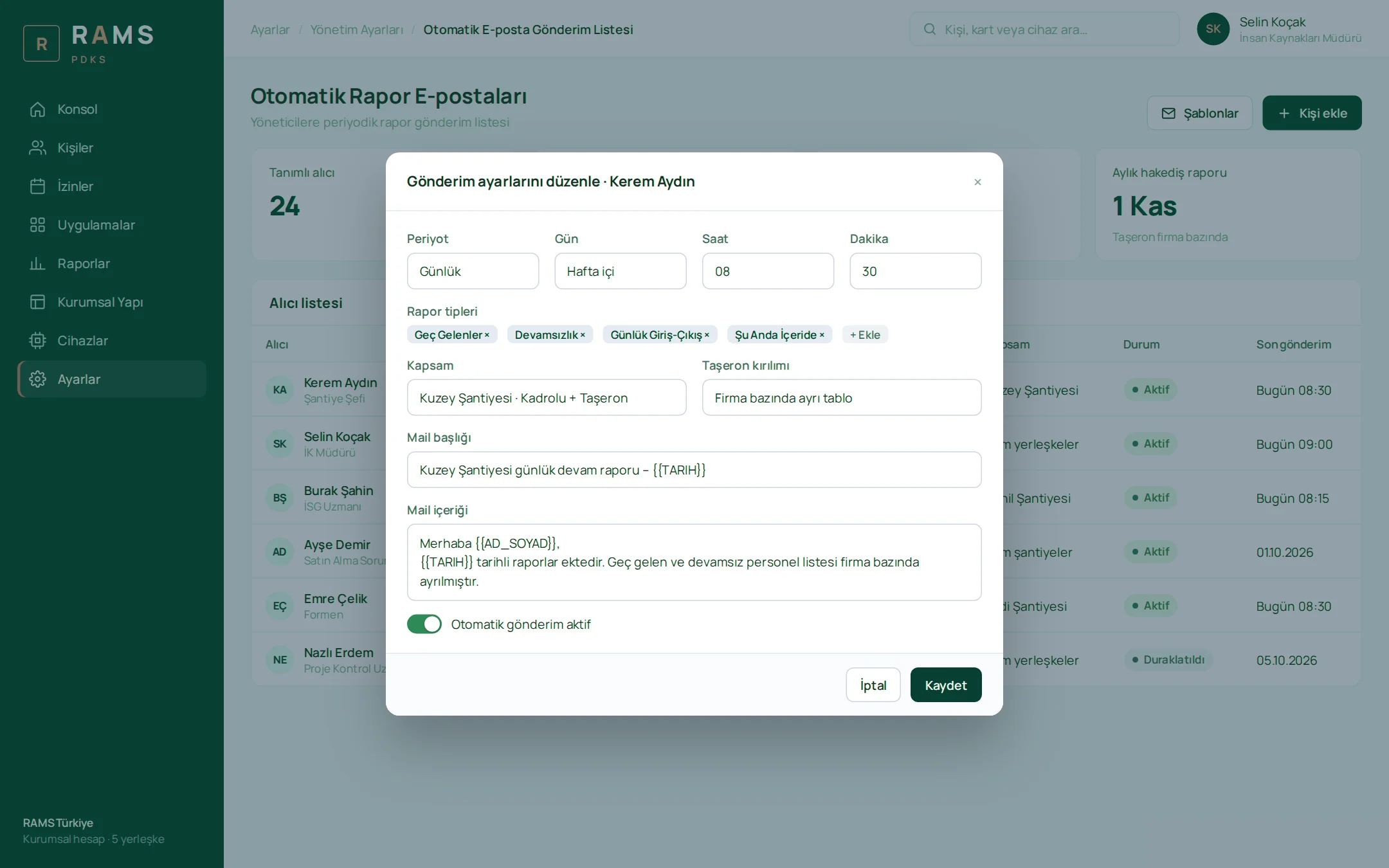
Before the project, site managers and HR compiled the late arrival and absence lists themselves every morning. Now reports such as late arrivals, early leavers, absence, undertime and people currently inside land in managers' inboxes on the set day and time. Which reports go to which manager, and when, is defined per person, and each manager receives the report for their own site. The subcontractor breakdown is added as a separate table, and the monthly progress payment report reaches accounting at the start of each month.
For those who want to dig into the details, there is the detailed monthly report. This report used to lack information on which gate each entry or exit was made through; now each cell shows the entry and exit time together with the point where the pass was made. Regular hours, overtime, undertime, absences, leave and holidays are color-coded, and the report is exported to Excel in one click.
What we learned on site
- Tie the card's lifetime to the person's record. If the card is removed from the devices the moment a departure is recorded, no forgotten active cards remain on site.
- Grant permissions to groups, not individuals. With high turnover, definitions made one by one take time and are easy to forget; a group gives newcomers the right permissions from day one.
- Build subcontractors in as a dimension. When company information applies at once in lists, reports, roles and emails, progress payment data does not have to be compiled separately.
- Don't request reports; subscribe to them. When the list compiled by hand every morning becomes an email that arrives at a set time, the manager's day starts with the report.
On a subcontractor-heavy construction site, a card should arrive with the person and leave with the person; every day in between is a gap for both safety and progress payments.
How many hours does it take to activate a card on your site?
If you manage a construction site, factory or warehouse with high subcontractor turnover, and card enrollment, progress payment calculations or morning reports are still handled by hand, we can adapt this flow to your organization. You can see the full platform on the RAMS PDKS project page or contact us.
About the author
Zeynep Çelik
Digital Content Specialist
She is part of Karatsoft's digital content team and writes blog articles. She explains in clear language which need each project and product answers and how it works in practice.



Comments
0No comments yet. Be the first to comment!
Leave a Comment
Feel free to share your thoughts and feedback with us.