


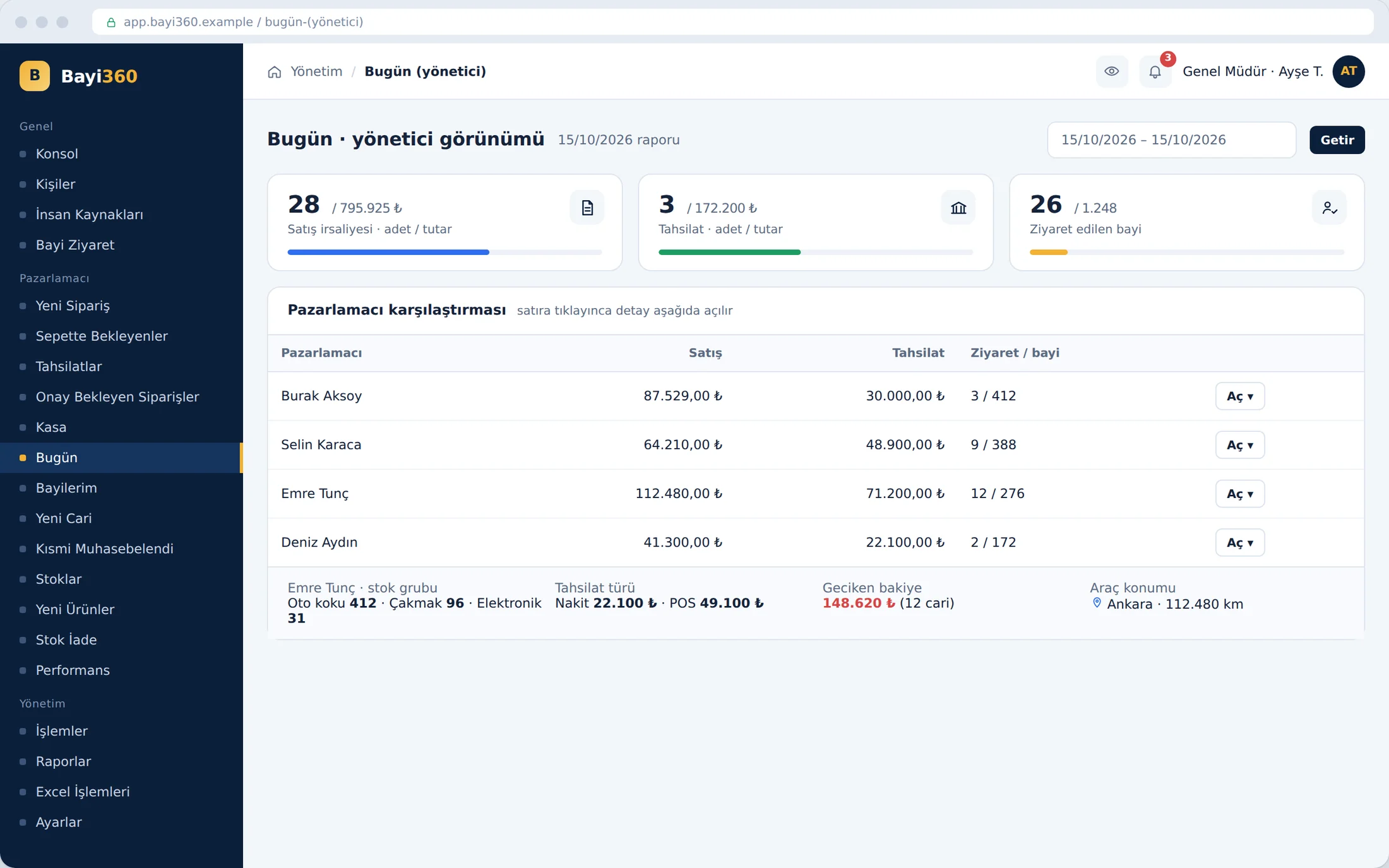
 Bayi360
Morning shipment preparation. The car accessories of one order sit at one end of the warehouse, and its cosmetics at the other. In the old setup the order was printed on paper, staff walked the shelves looking at the paper, and the courier barcode was written by hand afterwards. Mixing up two products with similar packaging, or forgetting a line item, were mistakes that could not be seen on paper.
Bayi360's second phase digitized this chain from the warehouse shelf to courier tracking.
The project in brief
Bayi360 is a B2B field sales and distribution platform, fully integrated with the ERP, that we developed for a distributor supplying retail outlets across Turkey. In the first phase, orders and collections were brought to the field; in the second phase, warehouse barcode scanning and logistics integrations were added; in the third phase, the promotion engine, return validation, bank reconciliation and the customer portal went live. Today, with more than 130 screens and reports, the system manages the whole chain from the field to accounting from a single hub. This article is the story of the second phase, that is, the flow that runs from the warehouse to the doorstep.
One order, several warehouse zones
The first decision was to split the order according to the reality of the warehouse. The subcategories on the sales side are grouped under main groups in the warehouse; when the multi-category order setting is on, a single order number is divided into separate lines according to the main stock groups it contains. This way, staff in different warehouse zones can pick the same order simultaneously and independently of one another. At the waybill stage these parts are merged again in a single table.
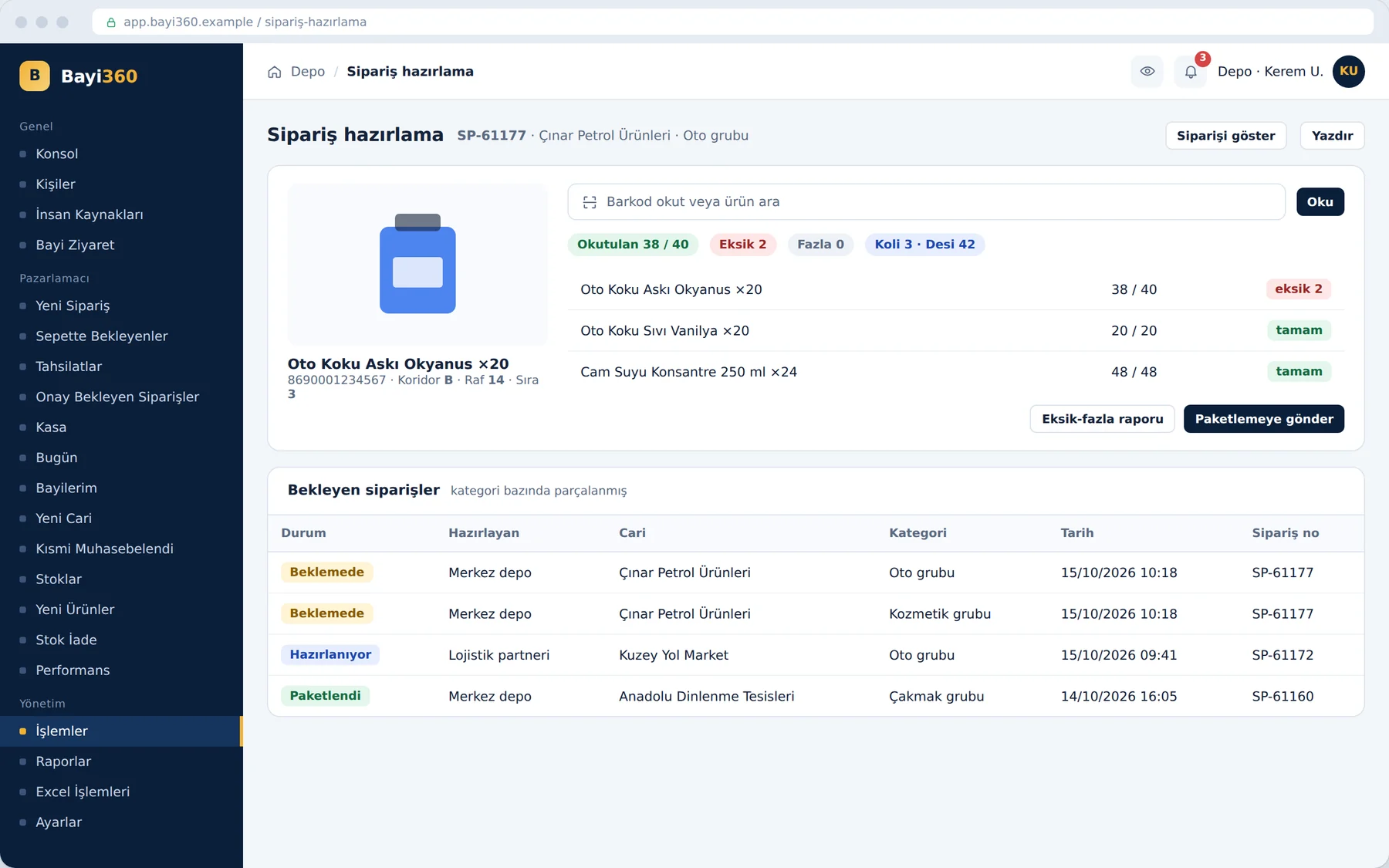
The picker's screen shows each product's aisle, shelf and row information. This information is fed from the ERP; the warehouse layout can be mapped in bulk with Excel. Warehouse staff do not see prices; their screen contains only the lines they need to pick.
Goods entering the warehouse are received with the same barcode discipline. When a product from a purchase order placed with a supplier is scanned, the product name, image and outstanding quantity appear on the screen; if the same company has more than one open order, the deduction is made from the order created first. The scanned quantities are held in a temporary table until the transaction is completed and converted into a purchase waybill, so no data is lost if a receipt is left half-done.
Barcode, image and sound: catching the mistake before it goes into the carton
When staff scan a barcode, the product's image appears on the screen. Comparing the box in their hand with the one on the screen turned out to be the simplest way to prevent products with similar packaging from being mixed up. When a quantity greater than the ordered amount is entered, the system sounds an audible alert and asks the staff member for a correction or a deliberate confirmation; line items that fall short are marked in red. Someone working between the shelves cannot keep their eyes on the screen all the time; at the moment of an error, it is the sound that stops them.
At the “Send to packing” step, the system has the report, which also includes the shortages and excesses in the order's other categories, confirmed one last time. Then the carton, volumetric weight (desi), carrier, driver and license plate details are entered. Every addition, deletion and quantity change on the scanning screen is logged to the second, with its previous and new values. When a problem comes up at shipment, the answer to “who deleted this line, and at what time” is ready.
The shipment date is marked as “today” or “tomorrow”. A wrongly printed waybill number can be changed only against a record that actually exists in the system; a faulty shipment can be sent back to the packing stage by withdrawing the waybill. Orders that could get stuck on hold when a new product category is defined after the order is placed are also found in the category check report and sent on their way with a single click.
From waybill to doorstep: three carriers, one flow
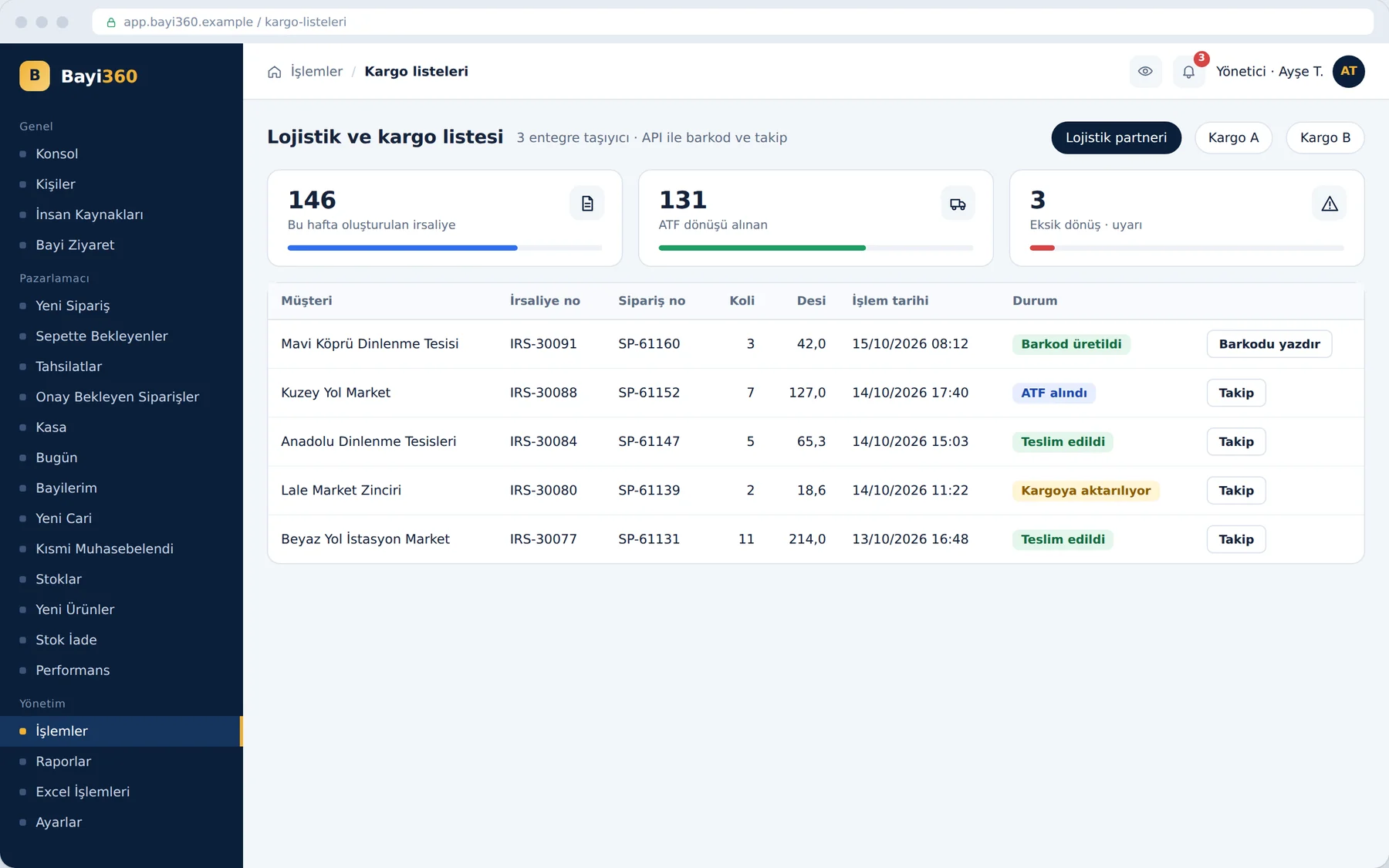
When a waybill is created, the courier barcode is no longer written by hand; it is generated through API connections set up with the logistics partner and two courier companies. The integration with the logistics partner goes deeper: the warehouse delivery slip and return information are fed back into the system, and customer service can follow the delivery in real time. Stock data is also synchronized every minute with the physical quantity in the logistics warehouse.
The same rigor was needed when creating waybills in bulk. The system processes the selected orders not as a single package but independently of one another and in sequence. If the connection drops in the middle of the operation or a time-out occurs, everything does not start over; the job resumes where it left off. Every data exchange with the logistics companies is also stored in courier logs separated by type. The waybill return, goods receipt and order status calls coming from the logistics side are monitored on a separate screen; when a transfer fails, error codes such as “stock not found” or “quantity error” are reported.
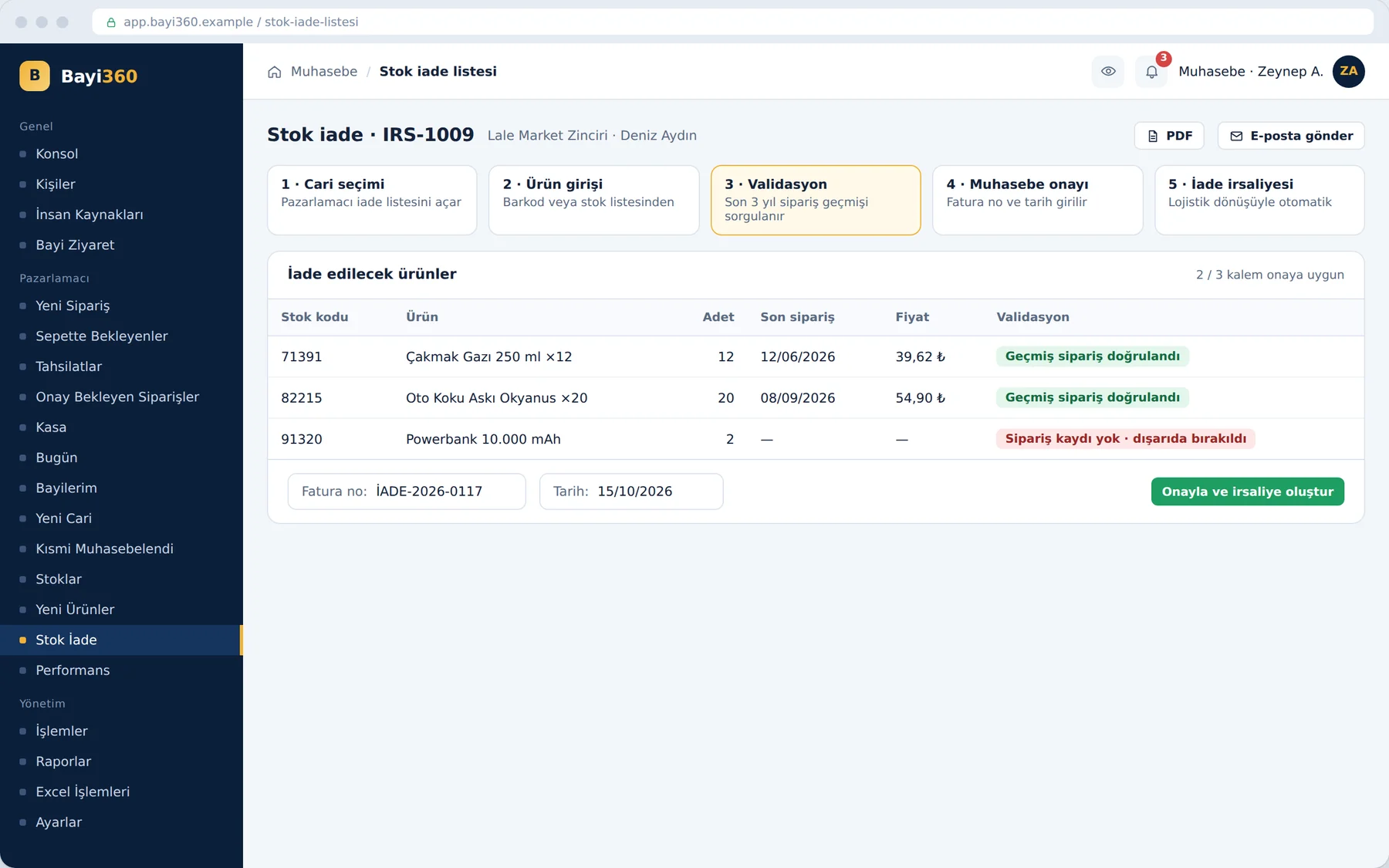
The same discipline works in the opposite direction too. In the return flow added in the third phase, the sales rep builds the return list in the field, while accounting verifies the products' past order records through the system. A product that was never ordered cannot be accepted as a return; the return waybill is created from the eligible items. As responses come back from the logistics company, return waybills are also generated automatically, according to the timing and the response.
What we learned in the field
- Split the order according to the reality of the warehouse. The sales category and the warehouse's picking route are not the same thing; the intermediate layer that maps one to the other made simultaneous picking possible.
- Give the alert to the ear, not just the screen. For someone working between shelves, an audible alert is noticed faster than red text on the screen.
- Do not make a bulk operation a single piece. Waybills processed independently and in sequence prevented the operation from starting over at the moment of an interruption.
- The integration must talk back too. Unless the delivery information returned by the carrier is entered into the system, customer service ends up reaching for the phone again.
The measure of digitalization in a warehouse is not the disappearance of paper but catching the mistake before the carton is closed.
Where are mistakes caught in your warehouse?
If your orders are still picked from paper, courier barcodes are written by hand, or you have to call the carrier to find out the delivery status, we can talk together about connecting the warehouse and logistics into the same flow. You can see the other screens on the Bayi360 project page and reach us from our contact page.
About the author
Selin Kaya
Digital Content Specialist
As a digital content specialist at Karatsoft, she prepares the blog articles. She explains in plain language what the products and projects are for and how they are used.


Comments
0No comments yet. Be the first to comment!
Leave a Comment
Feel free to share your thoughts and feedback with us.