


 Sinpaş YTSConnect
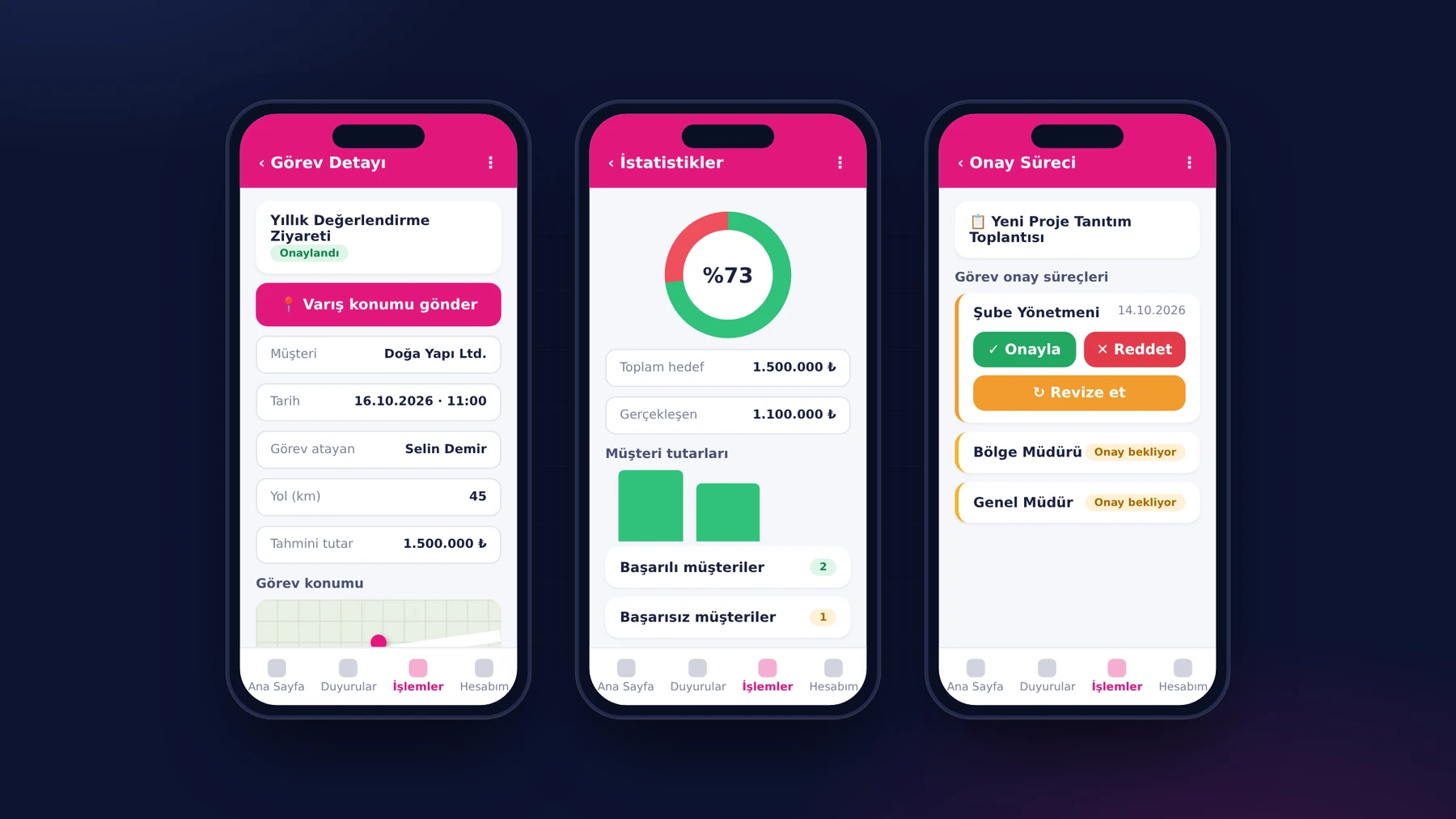
09:30. A Sinpaş YTS field representative creates a new field task on their phone for the afternoon's customer visits. They enter the task details, the location and the customers they will meet; a customer who is not on the list can be added from the same screen. The moment the task is created, a notification goes to the managers in the approval chain.
In the past, field visits and expenses were posted to accounting at month end, using documents collected then. In YTSConnect, this entire cycle starts and ends in the app in the representative's pocket.
The project in brief
YTSConnect is an HR and field operations platform we developed for Sinpaş Yapı Tasarruf Sandığı, which has dozens of branches and hundreds of employees. The employees' iOS and Android app brings together time tracking, leave, expenses, field tasks, training and announcements; HR and managers approve and report from the web panel; and the integration API talks two-way with the organization's CRM and ERP systems. Field task management went live together with the mobile app in the second phase of the project. Today the platform is actively used in all of Sinpaş YTS's branches; every new branch joins the system the moment it is defined in the panel and its QR code is generated.
The approval chain follows the organization chart
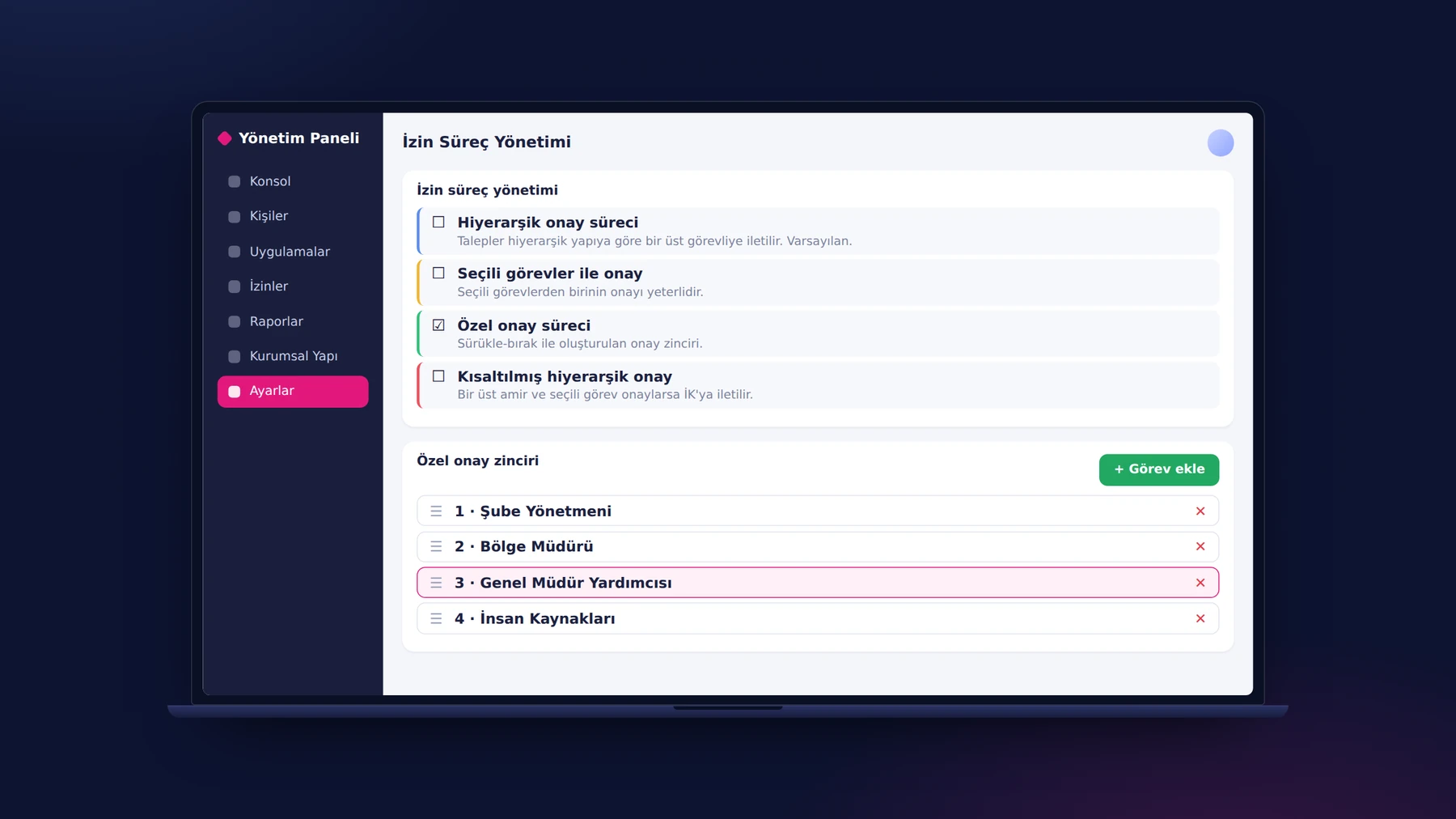
In a hierarchy running from head office to the regional offices and from branch management to field representatives, every department's approval flow was different, and a single standard chain satisfied no unit. So we built four approval models: hierarchical approval, approval by selected positions, shortened hierarchical approval, and a custom chain the organization builds itself by drag and drop. For field tasks, the chain is defined in the panel and runs from top to bottom; no code change is needed when the flow changes. In a field task opened from the panel, more than one assignee and customer can be selected; the selected people are notified according to the status of the request.
The approver's work is also on the phone. Tasks awaiting approval open from the app's home page; the manager approves the task, rejects it or asks for a revision. The representative, in turn, follows their tasks with their approval statuses in the same app and can filter by branch, person, approval status or date range. An authorized user sees all field tasks in their own area of responsibility in a single list, with the same filters, on the “All Tasks” page.
A task that starts with a location and closes with a document
On an approved task, the “Start Task” button becomes available and the location is sent as the task begins. On arriving at the customer, the representative submits a second location with “Send Arrival Location”. The expenses incurred along the way are added inside the task: expense category, the company where the expense was incurred, description, amount, currency, date and the receipt or invoice itself. The document is uploaded from the phone as a PDF, JPG or PNG, and the expense lands in the list as “awaiting approval”. The plus button in the task details reduces adding an expense to a single tap. The expenses page in the app lists the employee's expenses with date, amount and approval status; in the web panel, all expenses sit in a single list with branch, person, approval status and date filters, and the document is reviewed by opening it in a new tab.
When the visit ends, the representative completes the task and enters the result per customer. For completed tasks, the total target, the actual result, the success rate, customer amounts and successful or unsuccessful customers are generated automatically as statistics. The whole cycle is followed both on mobile and in the web panel; in the panel, under the task details, the approvers, the customers visited, the expenses and the completion information sit together from start to finish.
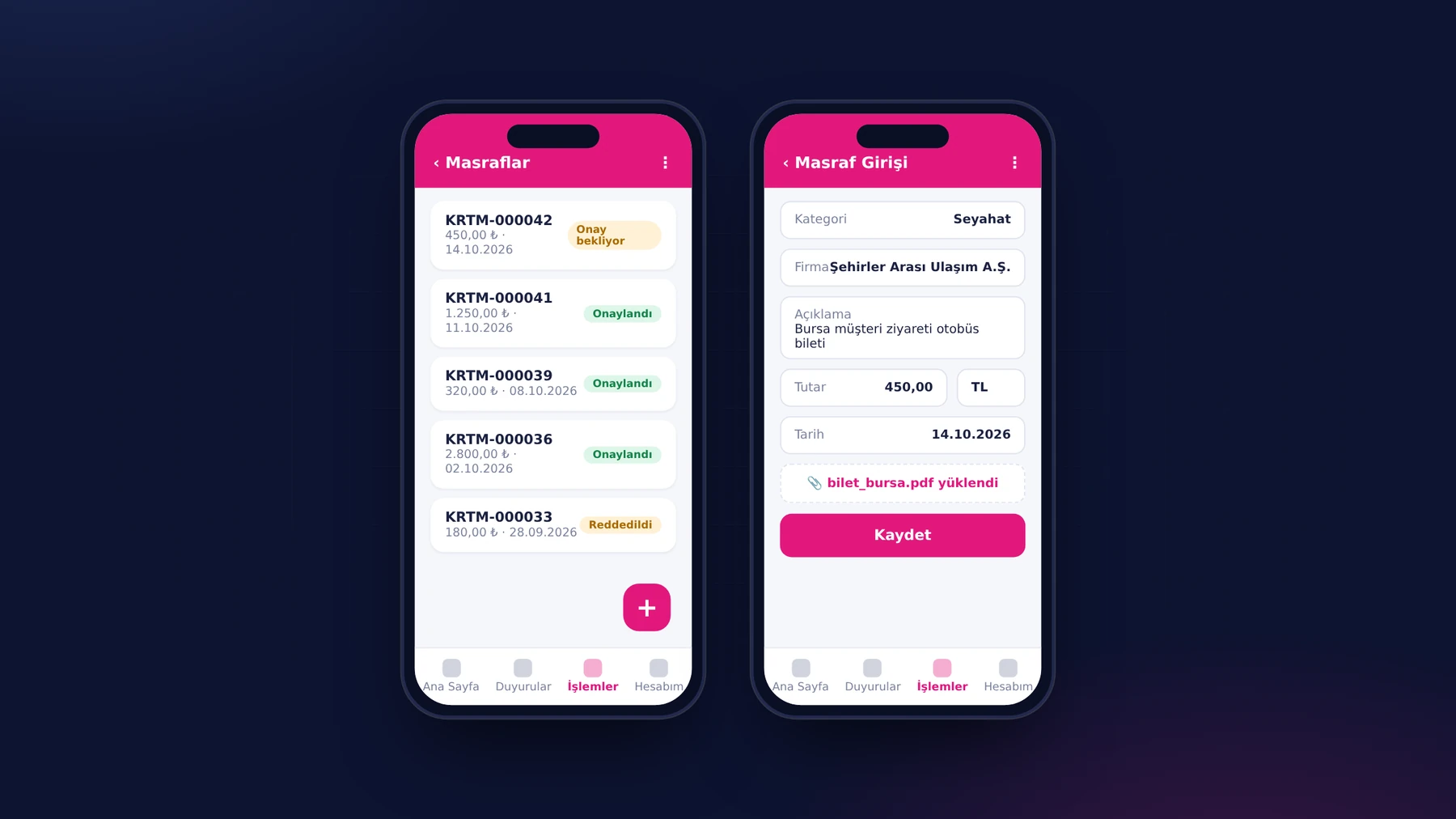
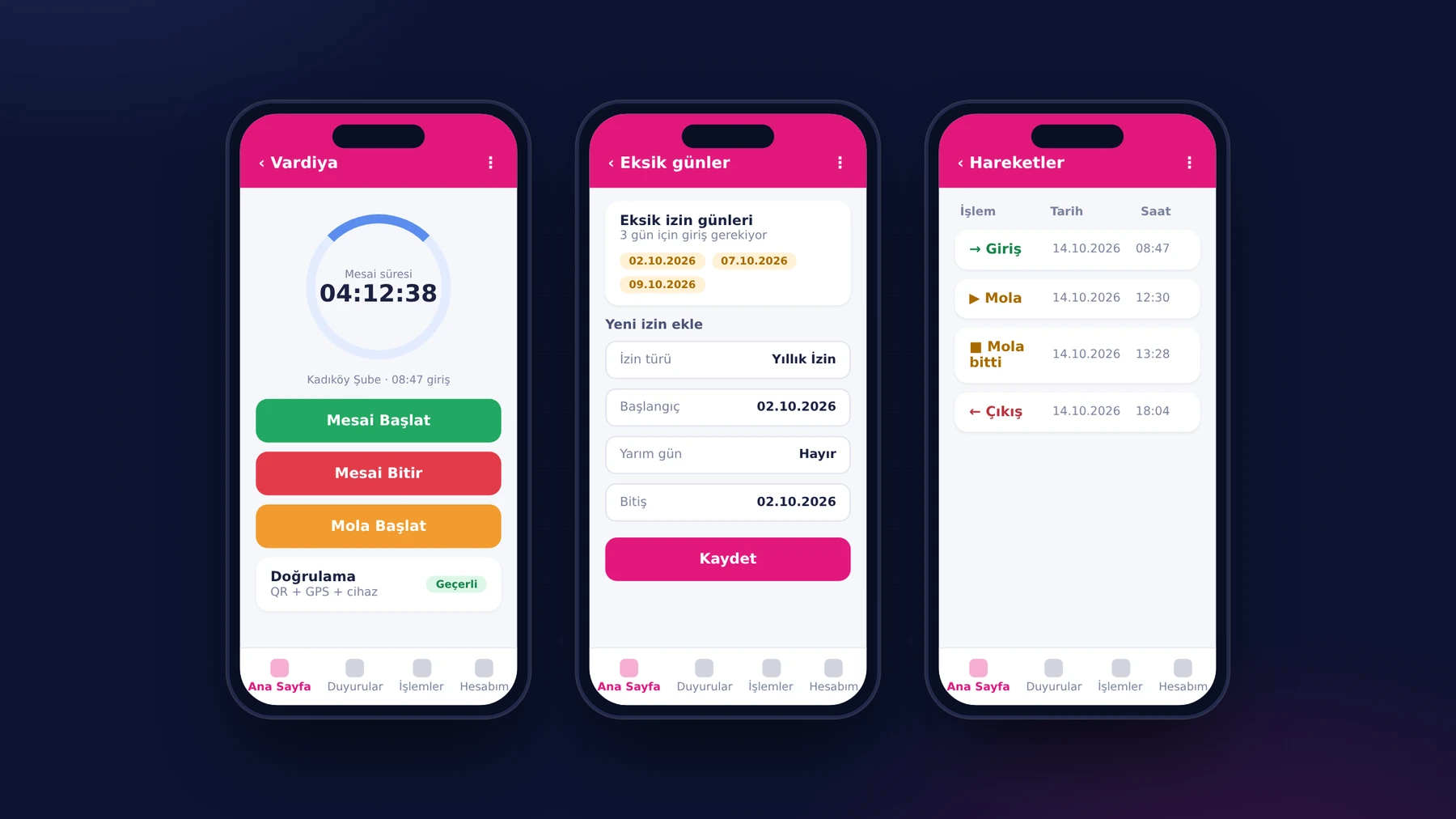
Expense and advance approvals move forward on the same record that finance works with. Expense and advance types are defined in the panel according to the organization; because the document sits inside the record, the approver does not have to look for the receipt separately, and the approval or rejection is shown together with the activity history. The same flow applies to advances: the request is opened with its type and amount, and the approval or rejection decision is written to the advance's activity history with its date and explanation. In the same app, the representative can open a leave request with a half-day option and the person who will cover, and sees the remaining leave entitlement on the request screen. The request lands in the list of leaves awaiting approval in their supervisor's panel; the leave taken is also turned into a printable reconciliation form.
At the end of the day: training and announcements in the same app
A representative's day is not made up of visits alone. Announcements, procedure and regulation documents, one-time surveys and daily celebrations are all in the same app; there is no need for a separate email chain. The trainings assigned to them are listed on the “My Trainings” page: the representative watches the training video and confirms with “I Watched the Training”, reviews PDF documents, and the content they have completed is tracked with a green tick. Trainings are assigned to groups; a person added to a group later gains access to those trainings automatically. In the panel, HR reports, person by person, who has completed which training, together with the badges and certificates earned.
What we learned in the field
- The approval flow should live in the panel, not in code. Because every department can build its own chain without writing code, the software does not have to change whenever the organization does.
- Location replaces self-declaration. The task start and arrival locations made the reporting of a visit beyond dispute.
- Capture the document where the transaction originates. When the receipt is uploaded from the phone at the moment of the expense, the month-end chore of collecting documents disappears.
- Statistics should not be extra work. The success rate and customer results are derived from the completion step the representative performs anyway.
For field teams, a good app is one that does not make them write the report separately. The report should be a by-product of the steps in which the work is done.
Where does your field team report its day?
If your field visits and expenses enter the records through documents collected at month end, or if every department's approval flow is a separate email chain, we can design together a cycle that starts on the field employee's phone. You can take a look at the Sinpaş YTSConnect project page or get in touch.
About the author
Zeynep Çelik
Digital Content Specialist
She is part of Karatsoft's digital content team and writes blog articles. She explains in clear language which need each project and product answers and how it works in practice.



Comments
0No comments yet. Be the first to comment!
Leave a Comment
Feel free to share your thoughts and feedback with us.