


 Bayi360
18:40. The field sales rep leaves the day's last dealer with a cheque in their bag and a few receipts in their pocket. In the old setup, these papers would reach head office days later, accounting would key them into the ERP one by one, and management would see the answer to “who visited which dealer today, what they sold, what they collected” only at month end.
In Bayi360, the picture of the same evening is different: the collection was recorded at the dealer's door; the record sits in accounting, on the manager's screen and in the audit trail at the same time. In this article we describe the collection flow we brought to the field in the platform's first phase and the decisions that make it reliable.
The project in brief
Bayi360 is a B2B field sales platform, fully integrated with the ERP, that we developed for a distributor supplying fast-moving consumer goods to hundreds of retail outlets across Turkey. Sales reps, accounting, the warehouse, the logistics partner and dealers work on the same data, within their own authorization limits. We started by building an operations layer on top of the ERP without changing it: in the first phase, orders and collections were brought to the field, and in later phases the warehouse, logistics, promotions, returns and bank reconciliation were added. Today the system runs with more than 130 screens and reports.
A record, not a receipt: collection at the dealer's door
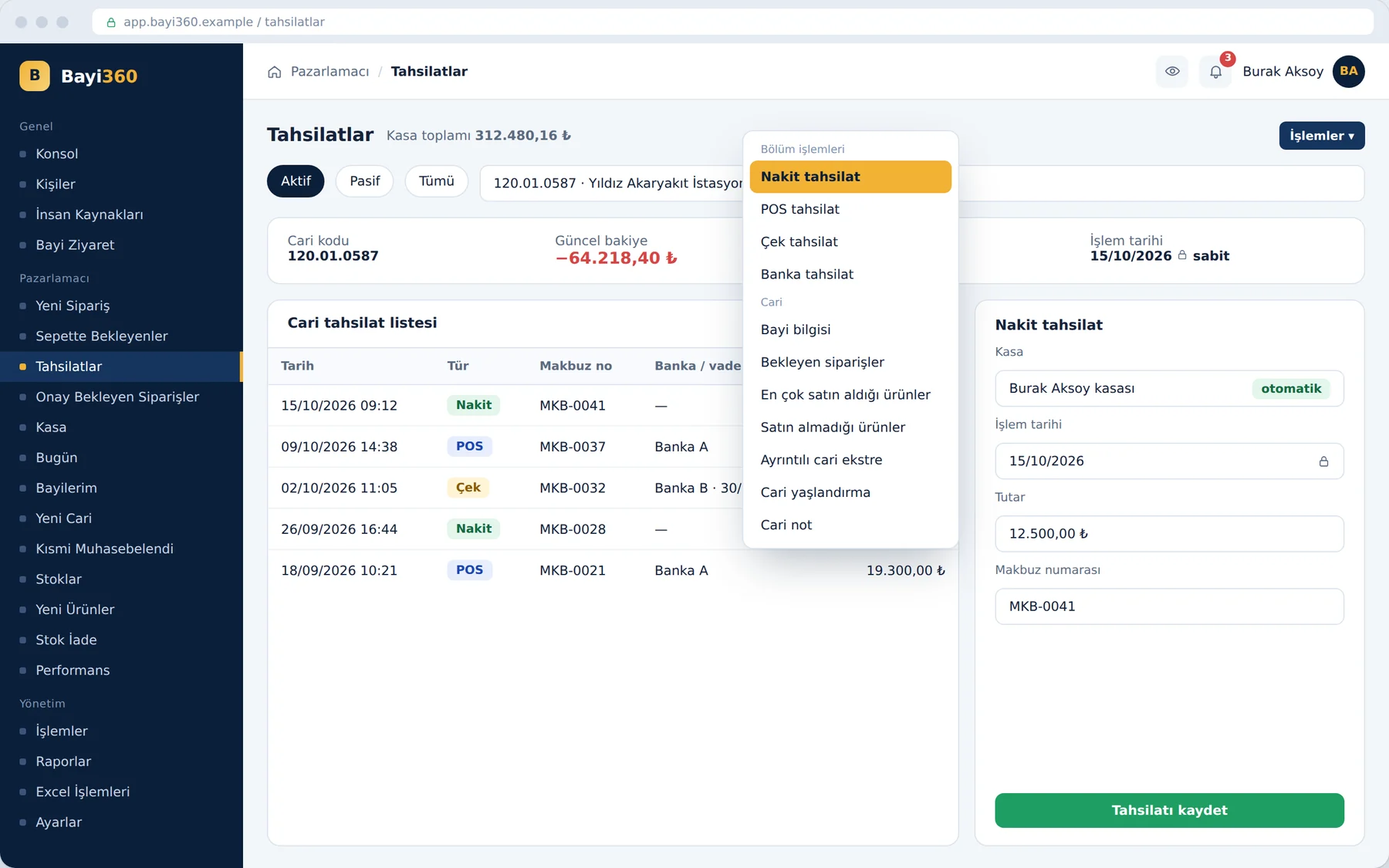
The moment the sales rep selects the dealer on the collections screen, the customer account code, company name and current balance are read live from the ERP. Cash, POS, cheque or bank collections are entered from the same screen and turn directly into an accounting record. Nobody at head office needs to transfer data from paper.
Alongside speed, discipline was needed too. That is why we built the screen's rules around the most frequent mistakes in the field:
- Automatic cash account detection: The system itself selects the cash account tied to the sales rep's account code; it is impossible to post a record to the wrong cash account.
- Date lock: The sales rep can transact only with today's date; choosing a past or future date belongs to the administrator and accounting roles.
- Mandatory fields: For a cheque, the due date, place of issue, bank and IBAN; for POS, the bank and receipt number; no record is created until they are entered in full.
Transferring the cash in the cash account to the bank is also done from the same place, from the sales rep's own cash account. The question “where is the money” is no longer phone traffic but a screen query.
The same discipline applies when a new customer is identified in the field. The customer account record the sales rep opens is created as a “potential customer” and does not become a real customer account without accounting approval. The record is not completed until the phone and email fields pass format validation; the data transferred to the accounting software thus stays clean at its source.
The management Today screen and the self-verifying visit
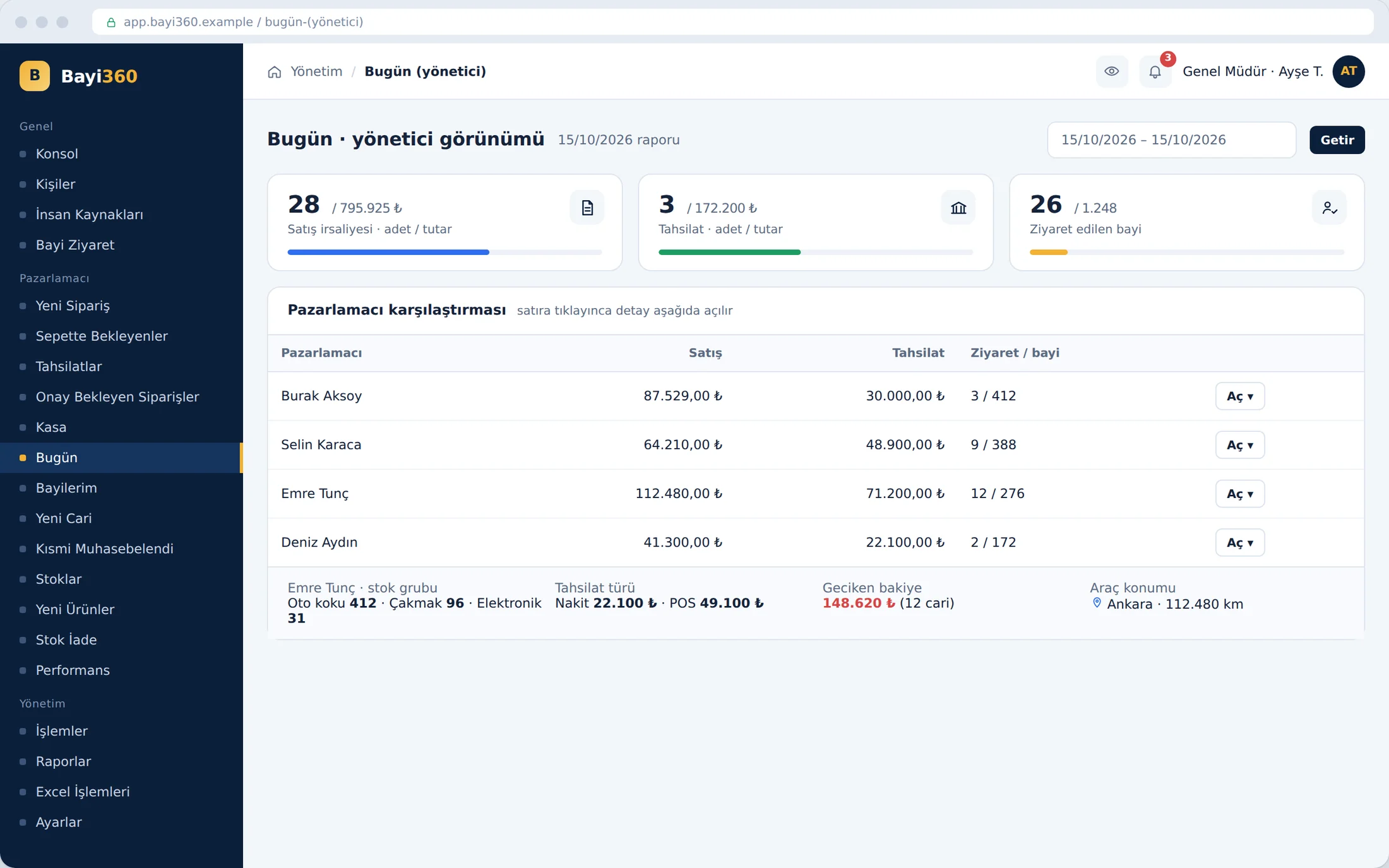
When data arrives from the field instantly, management's view changes too. On the “Today” screen, the administrator compares all sales reps with their sales, collection and visit data in a single table; when they click a row, that person's daily details open on the same screen, with the vehicle's location next to them. Sales reps, on their own “Today” screen, follow their order, waybill, invoice and collection totals and the dealers they visited and skipped.
No separate form is filled in for the visit report. A dealer for whom a collection or an order was entered during that month is automatically counted as “visited”. The uncertainty of manually kept visit reports thus disappears; the proof of the visit is the work done itself.
Before a visit, the sales rep sees in the aging report the dealer's open and partially paid invoices with their days overdue or remaining until the due date, and the remaining balance. Closed invoices are hidden, the “overdue debts” filter brings risky receivables to the front, and the report can be exported as a PDF and taken to the dealer meeting.
The trail that remains even when deleted from the ERP
There was a situation often encountered in accounting software: when a record was deleted or its amount changed, nobody could see its original state, and the question “who changed this amount” fell to the technical team. Since we could not touch the ERP's table structure, we built the solution outside it.
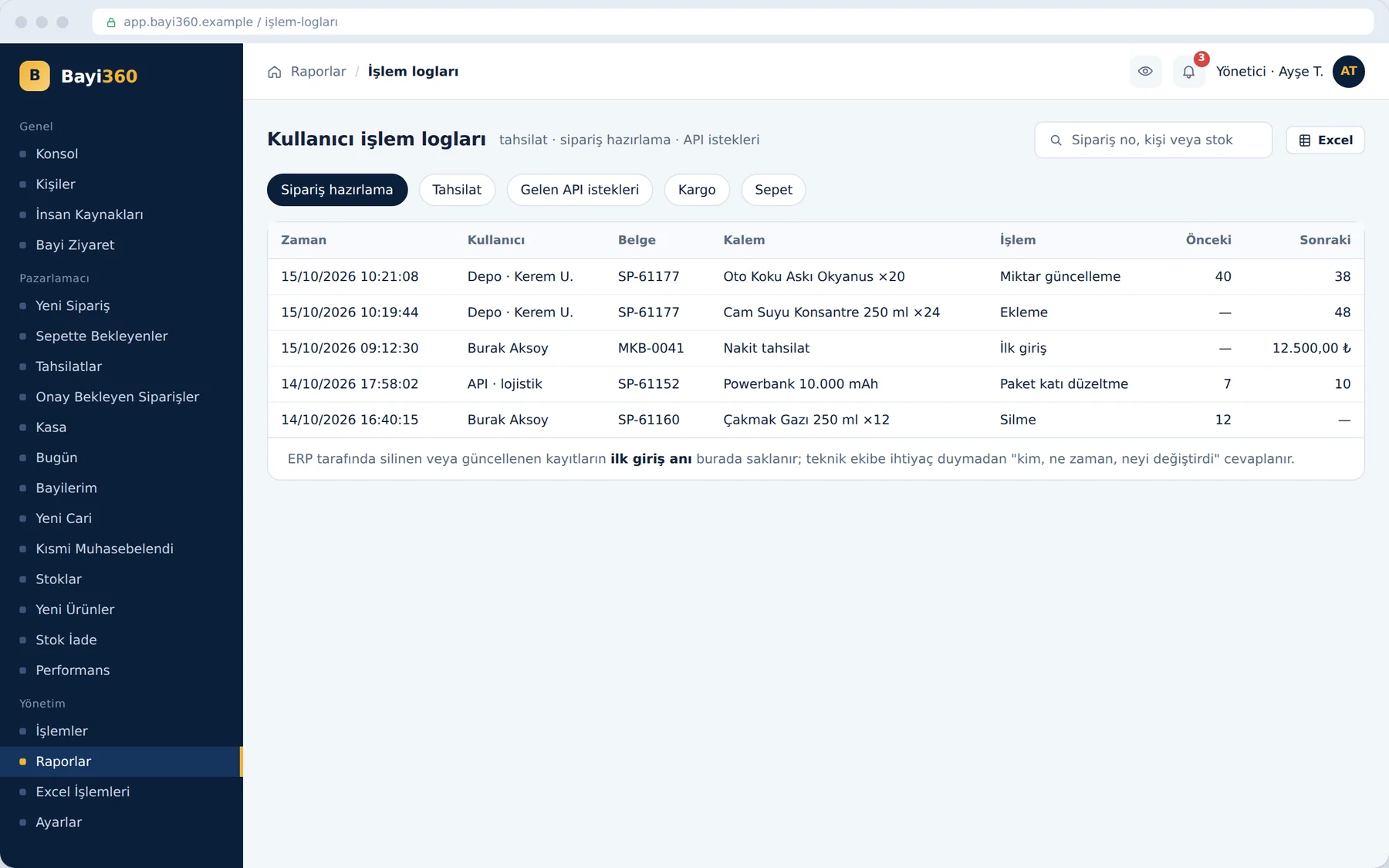
Bayi360 stores collection, order preparation, cart, API and courier transactions in a table independent of the ERP, together with the moment of first entry and the previous and new values. A deletion or update made on the ERP side does not affect this record. When accounting sees the physical paperwork from the field, it sets the “original seen” mark; because this mark also lives in the same independent area, it cannot be changed through the accounting software.
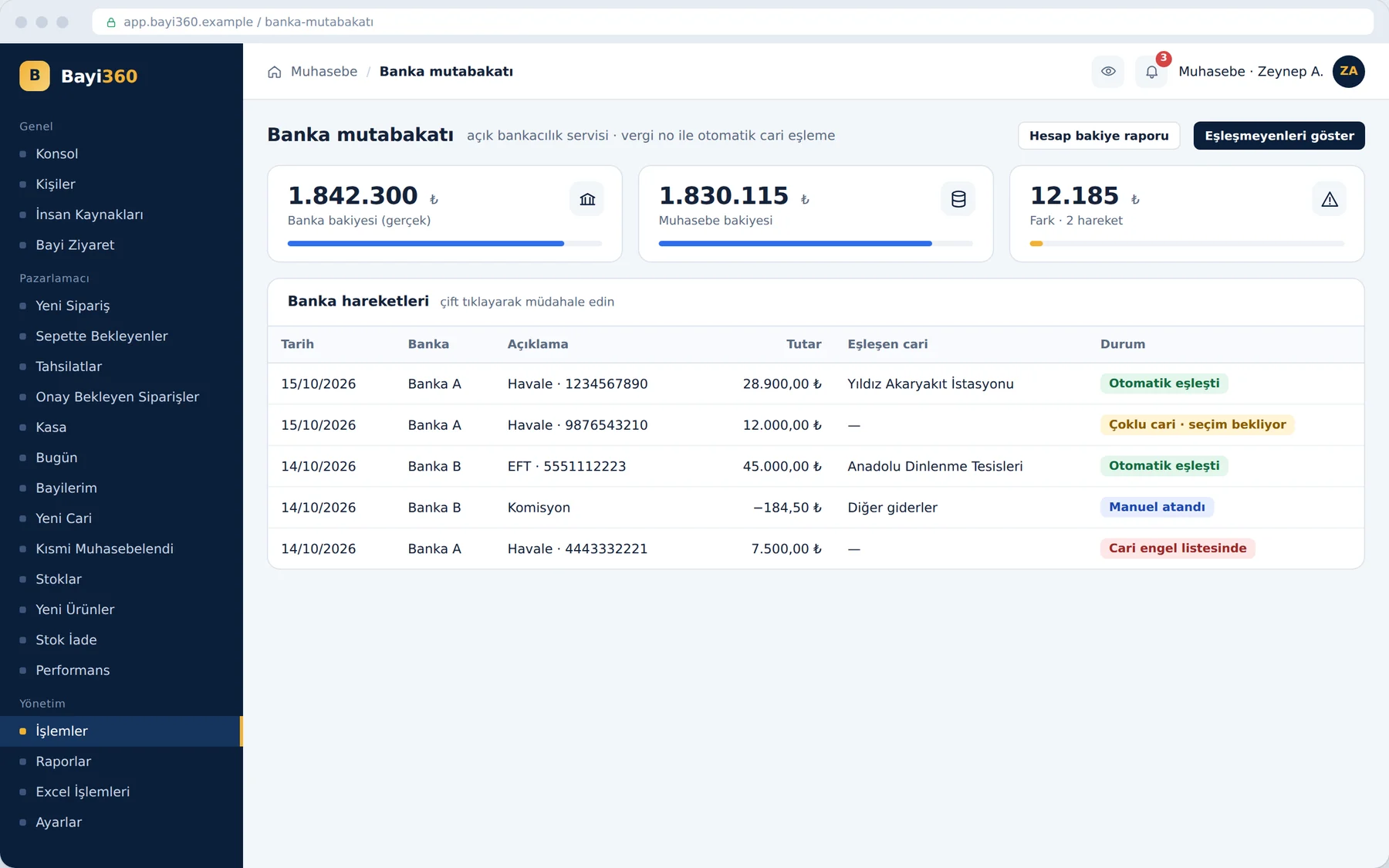
The last link of the collection cycle closes at the bank. The bank reconciliation added in the third phase matches the transactions coming from the open banking service to the relevant customer account through the tax number. When more than one customer account is tied to the same tax number, the user routes the transaction by double-clicking it; a block list is also kept for customer accounts that must not be processed automatically. Unmatched amounts can be assigned manually to the relevant customer account, to another bank, or to other expenses such as transfer fees and commissions. The difference between the bank balance and the accounting balance appears in a separate report.
What we learned in the field
- Speed and control can be built on the same screen. The date lock and the automatic cash account reduced accounting's workload without slowing the field down.
- Produce the proof from the work itself. Deriving the visit report from orders and collections, instead of making it a separate task, made the report beyond dispute.
- You do not have to change the ERP. Keeping the audit data outside the ERP but in sync with it brought traceability without touching the existing system.
- The same picture every evening. Collection, waybill, accounting, logistics and bank reports go out by email to the relevant people every evening; those that cannot be sent are retried automatically.
When every transaction in the field is one that head office also knows about the moment it is recorded, the month-end close stops being a discovery and becomes a control step.
What does the picture look like in your field?
If your field team still carries collections around as receipts, your managers see the picture of the day only at month end, or your ERP has no answer to the question “who changed this”, we can discuss a similar transformation together. You can examine all of the project's modules on the Bayi360 project page and get in touch with us to describe your own process.
About the author
Zeynep Çelik
Digital Content Specialist
She is part of Karatsoft's digital content team and writes blog articles. She explains in clear language which need each project and product answers and how it works in practice.


Comments
0No comments yet. Be the first to comment!
Leave a Comment
Feel free to share your thoughts and feedback with us.