Skip to content
Project
  • Web
  • Mobile

Evion EV Charge

Electric Vehicle Charging Network Operations Platform

A charging network operations platform that brings the admin panel, the driver app and charger communication together in one hub, is OCPP-compliant and runs EPDK and GİB processes automatically.
  • OCPP 1.6
  • OCPP 2.0.1
  • EPDK ŞEBİS
  • GİB EŞÜ
  • ERP (SAP-compatible)
Evion EV Charge - Electric Vehicle Charging Network Operations Platform showcase image

Project Summary

Evion EV Charge is an end-to-end platform built to operate electric vehicle charging stations from a single hub. The chargers in the field, the admin panel used by the operations team and the app on drivers' phones all connect to the same central server; charger status, pricing, customer records, payment collection and official notifications are gathered in one place.

The platform consists of three components:

  • Central server — communicates in real time with chargers of any brand that speak OCPP 1.6 and OCPP 2.0.1; decisions, pricing, records and payment collection all run here.
  • Admin panel — Opens in a browser and requires no installation. Live monitoring, remote commands, field inventory, tariffs and promotions, customer and wallet management, revenue-sharing reports and regulatory integration logs, all in a single menu.
  • Driver app — One app for Android and iOS. Map, station details, charging by QR code, live tracking, reservations, wallet and invoice details.

When a charge ends, payment collection, the notification to EPDK (Turkey's Energy Market Regulatory Authority) and the invoice request run on their own; the team does no separate data entry. Thanks to the multi-tenant architecture, a second brand or a completely separate network can be opened on the same installation; partner operators such as shopping malls, hotels or public institutions see their own locations, and the revenue share is written to the record at the start of every charge.

Your next transformation

Let's plan a similar transformation for your operations

Tell us what you need; we'll set out the scope, integrations and roadmap in writing in the first meetings. Built around the way you work, without touching your ERP, accounting or banking systems.

  • Written scope and roadmap
  • Integrated with your existing systems
  • Post-launch support from the same team
Explore other projects
Project details

A closer look at the Evion EV Charge screens

The main screens and their highlights: on every image we magnify the area that matters most. Tap an image for details.

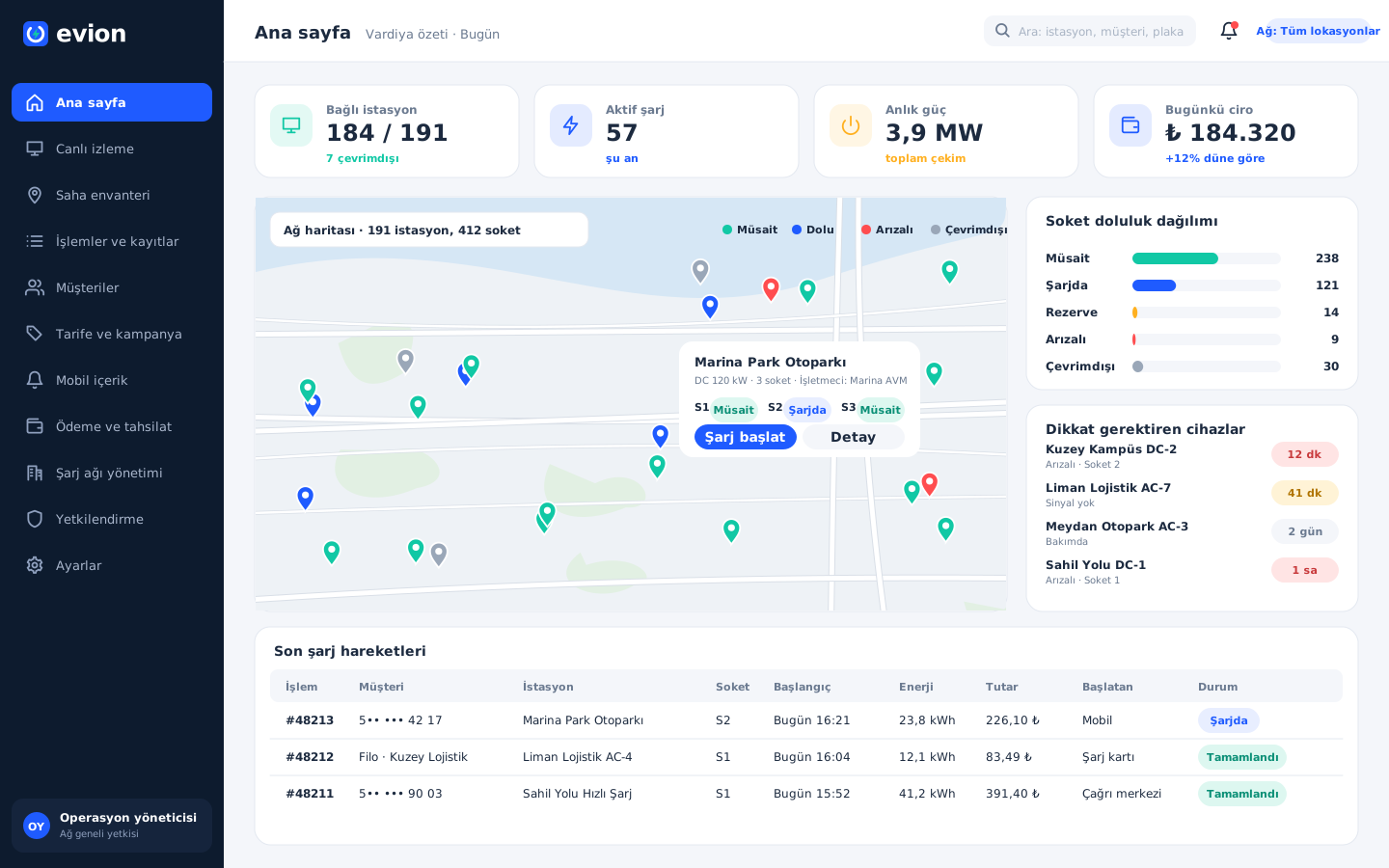
Home page and shift summary

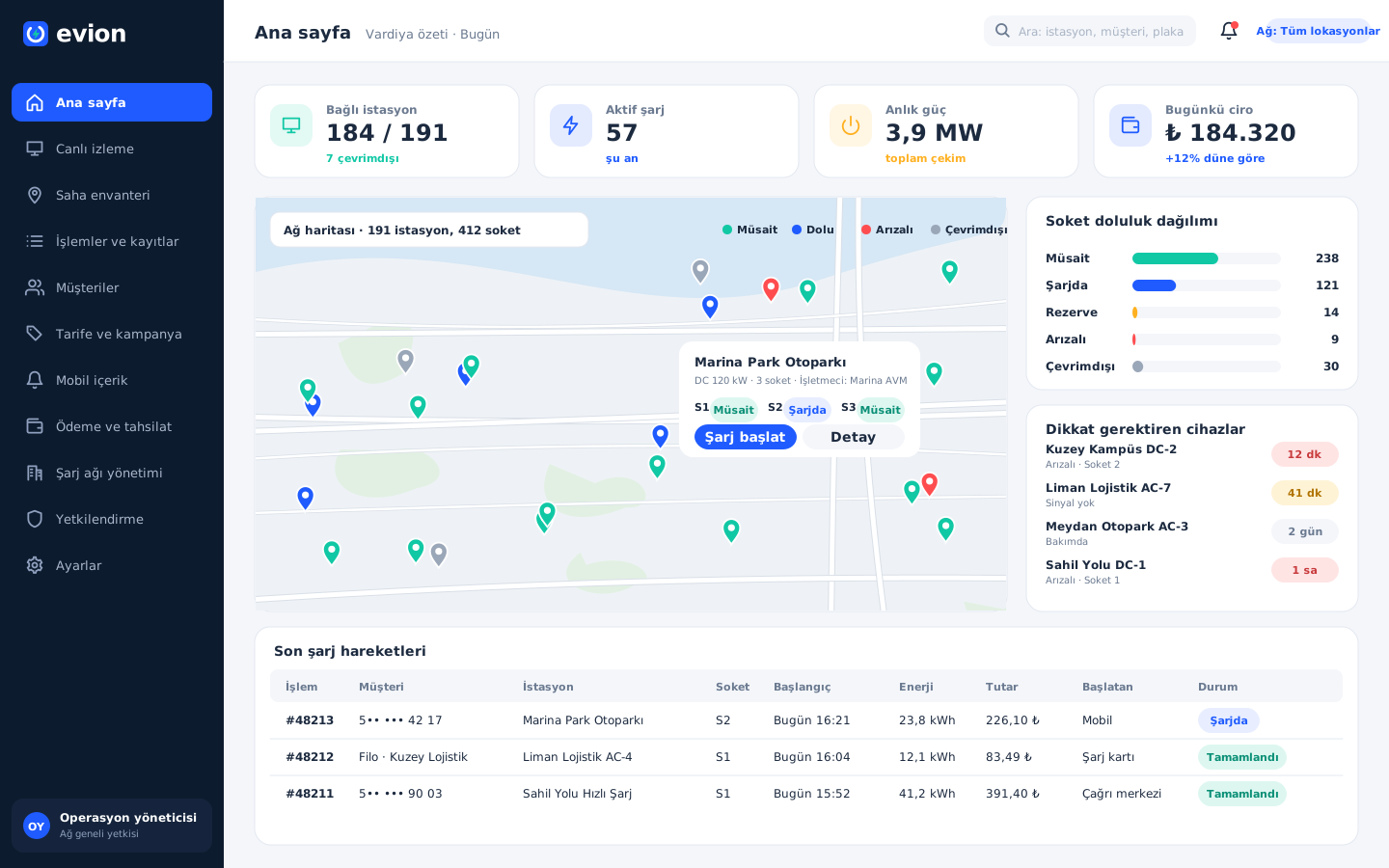
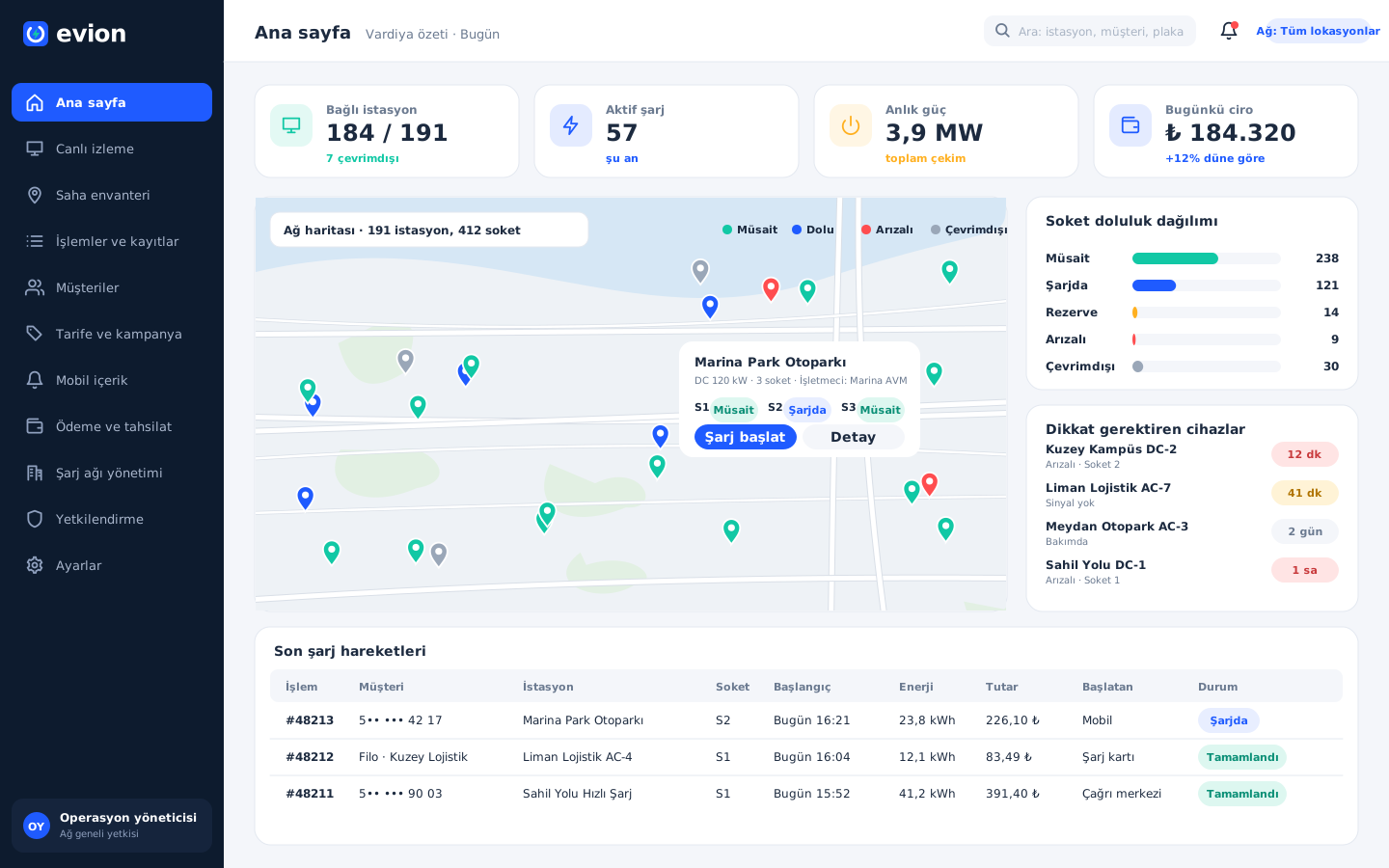
The operations team starts its shift with this screen: all stations on the map, the number of connected and disconnected chargers, the connector occupancy breakdown, the total power being drawn at that moment and the day's revenue are visible at a glance. Chargers that report a fault or send no signal stand out in a separate list; the latest charging activity also streams down the same page.

Home page and shift summary

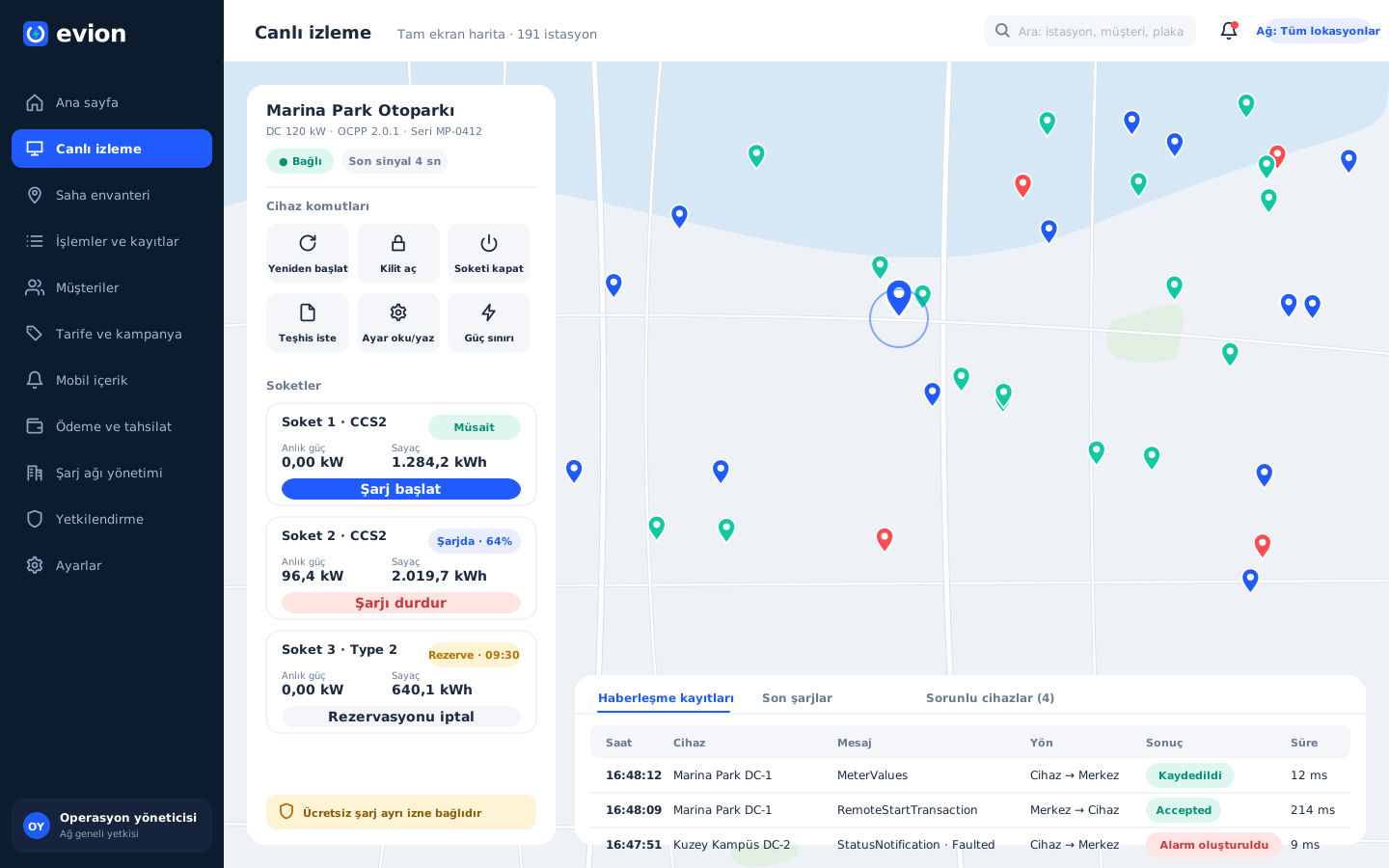
Live monitoring and remote intervention

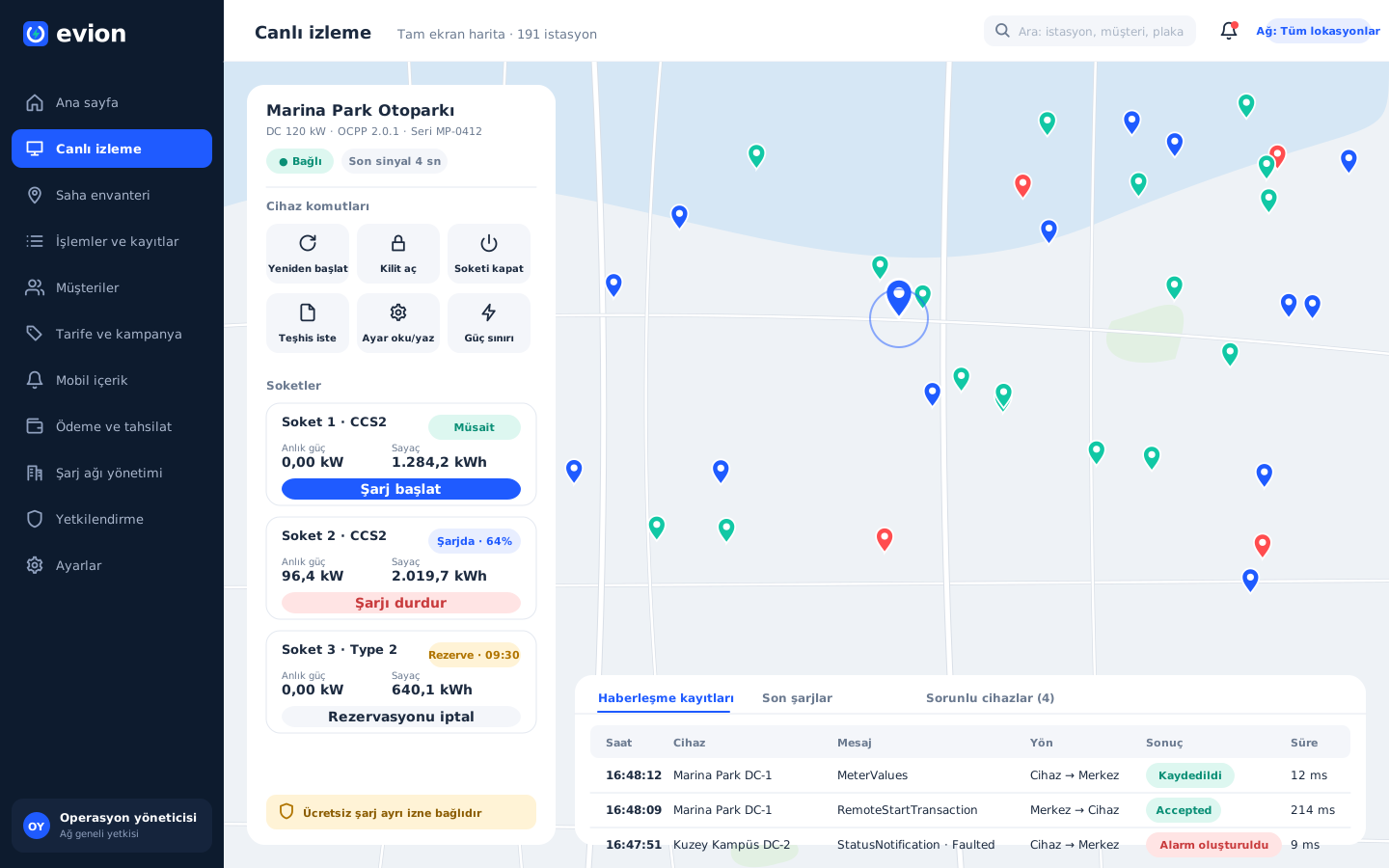
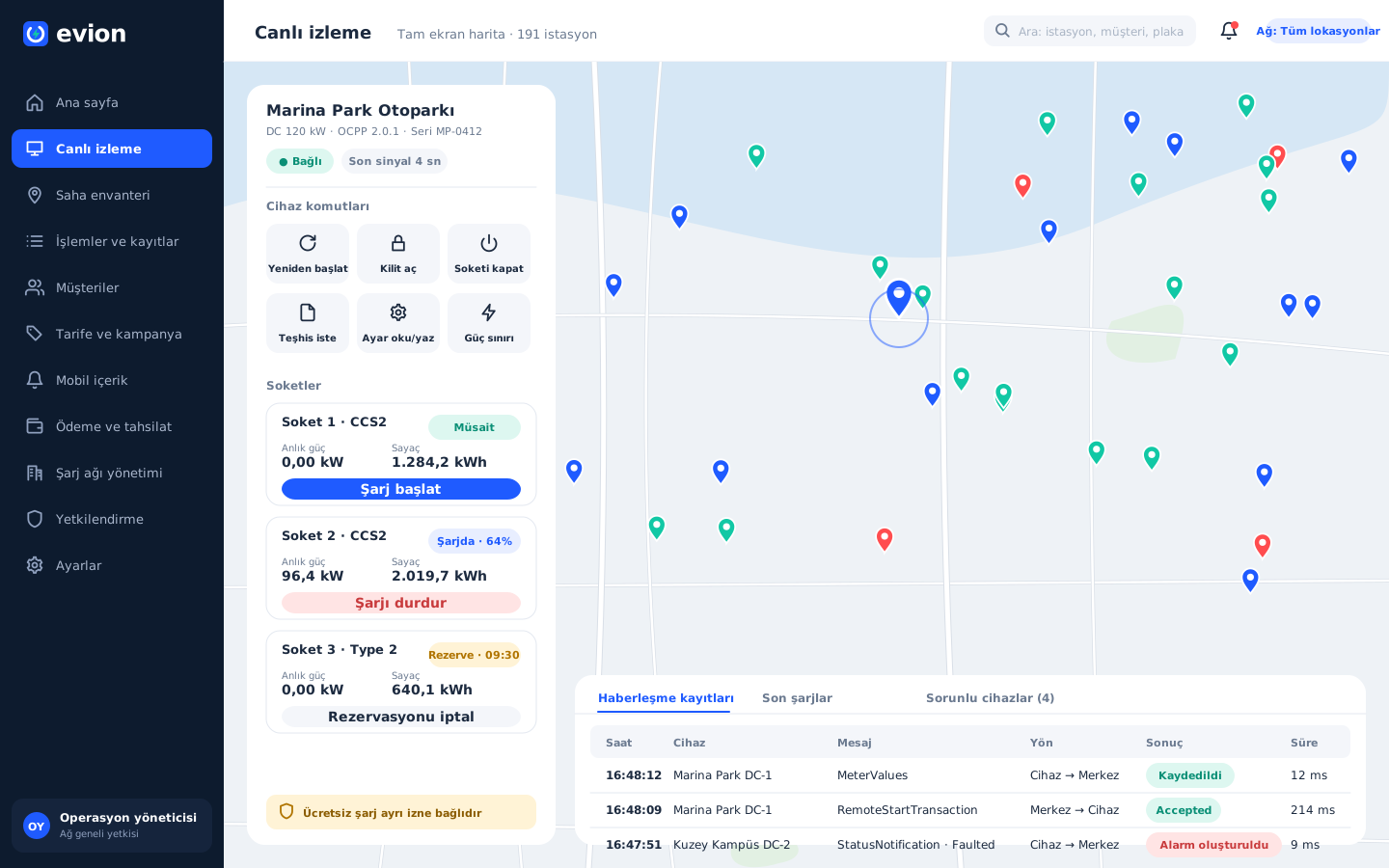
When a charger is selected on the full-screen map, a side panel opens: connection status, last signal, connectors, meter and current power. From here the team sends commands for restart, unlock, connector disable, diagnostics file, power limit, and reading and writing settings; it follows the charger's response in the communication logs below.

Live monitoring and remote intervention

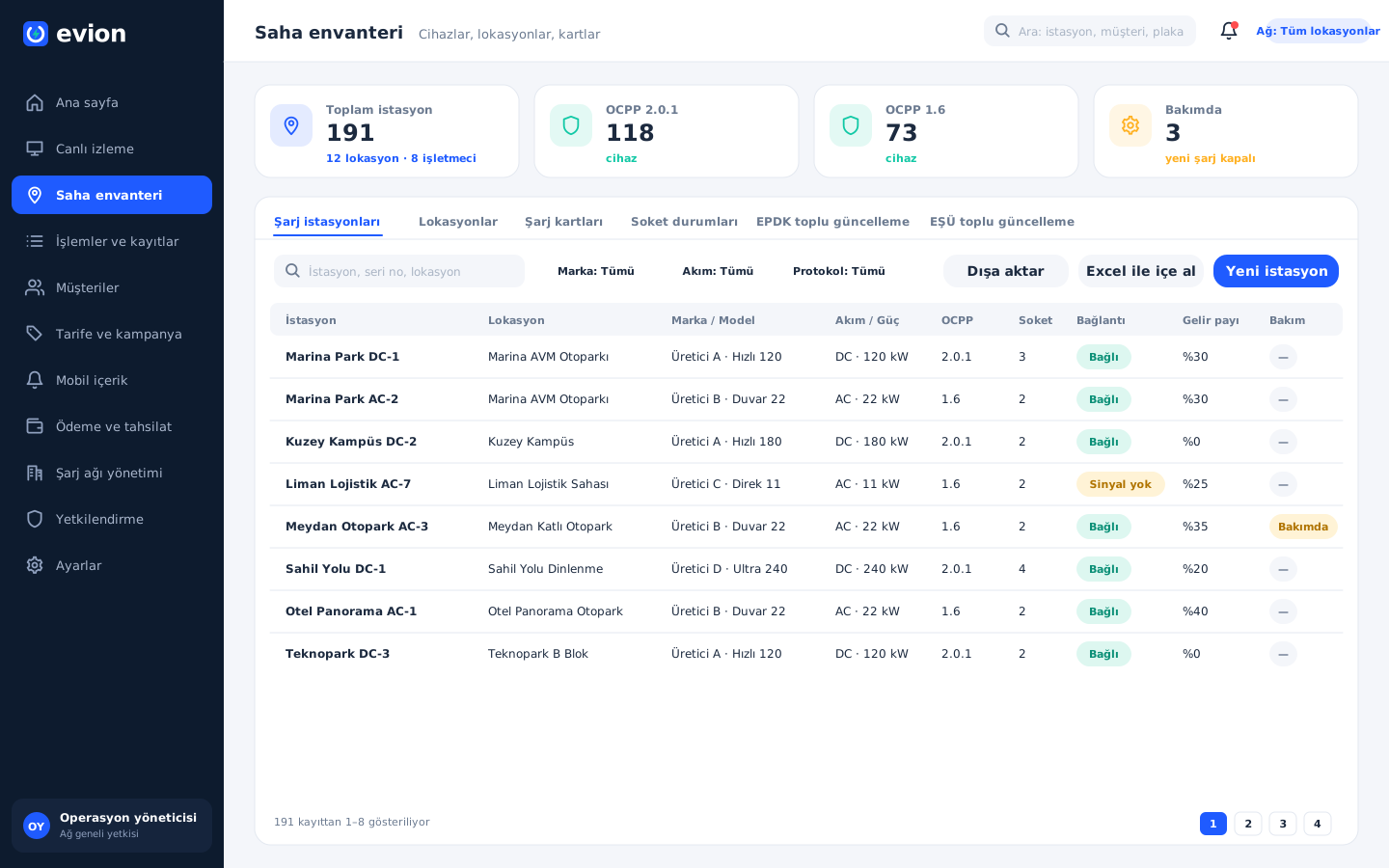
Field inventory and charger compatibility

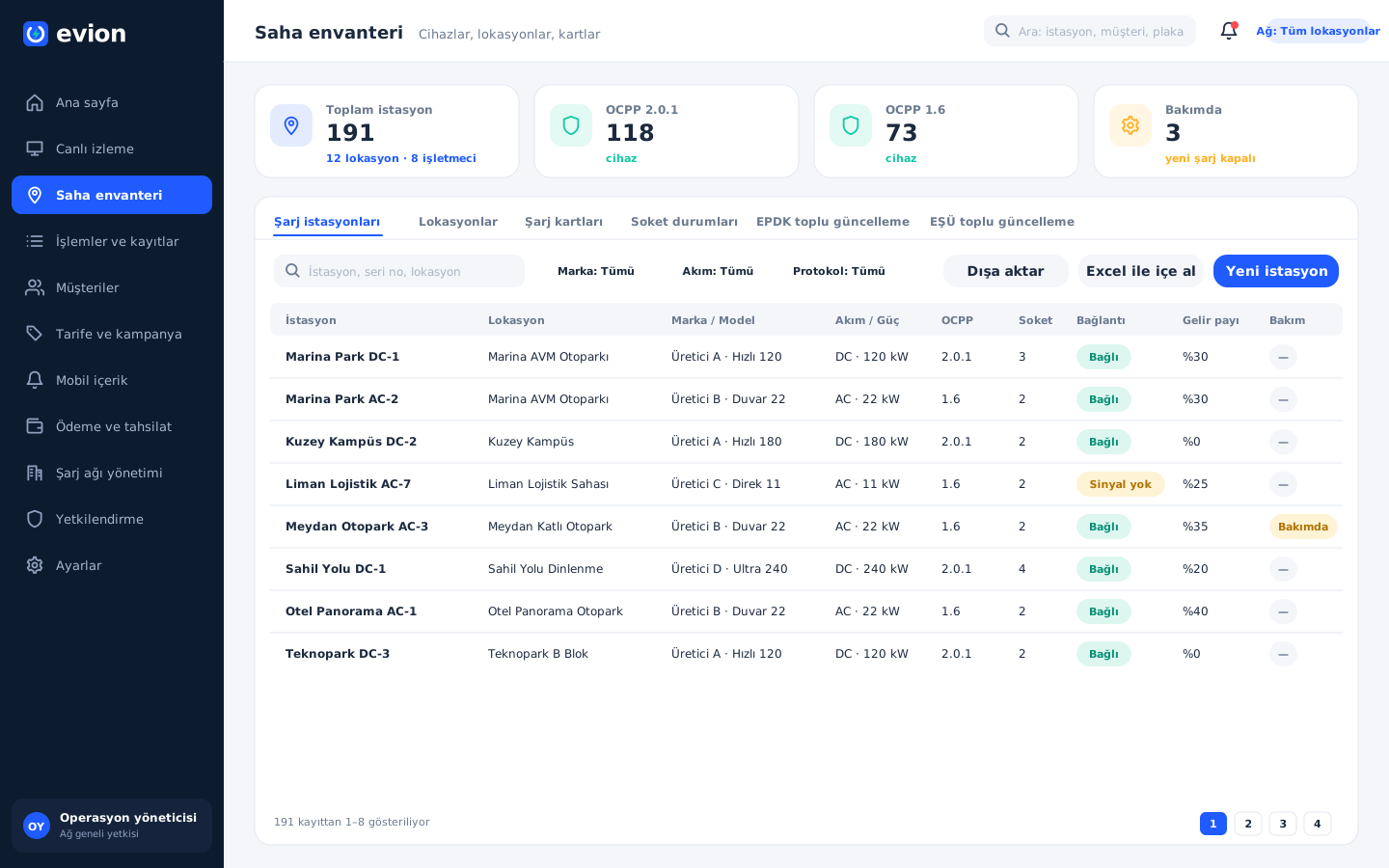
Every charger in the field sits in a single list with its brand, model, current type, power, OCPP version, number of connectors, connection, revenue share and maintenance status. The team imports new chargers in bulk with an Excel template and exports the list; tabs for location, charging card, connector status and EPDK and EŞÜ bulk updates are on the same screen.

Field inventory and charger compatibility

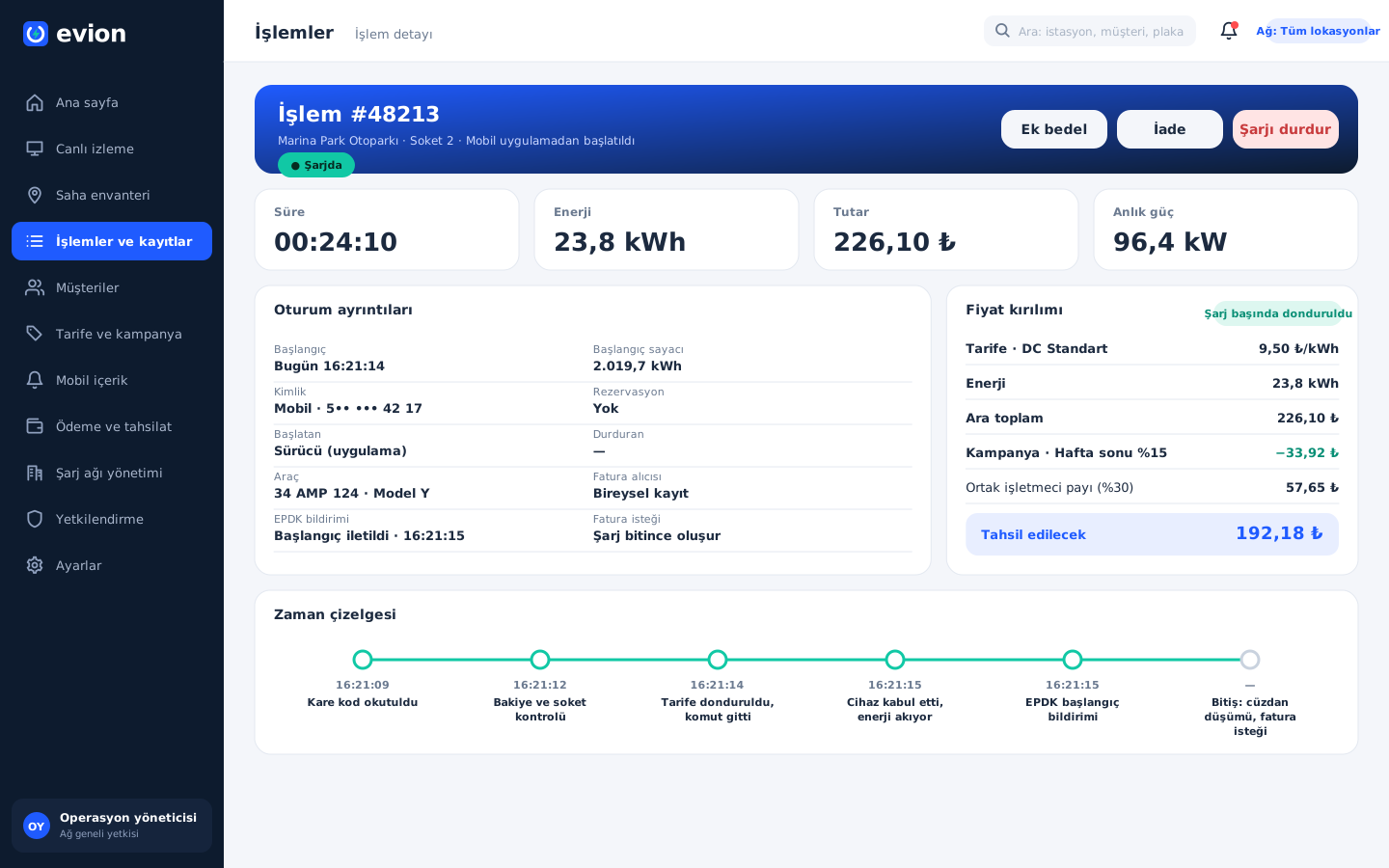
Transaction record and price breakdown

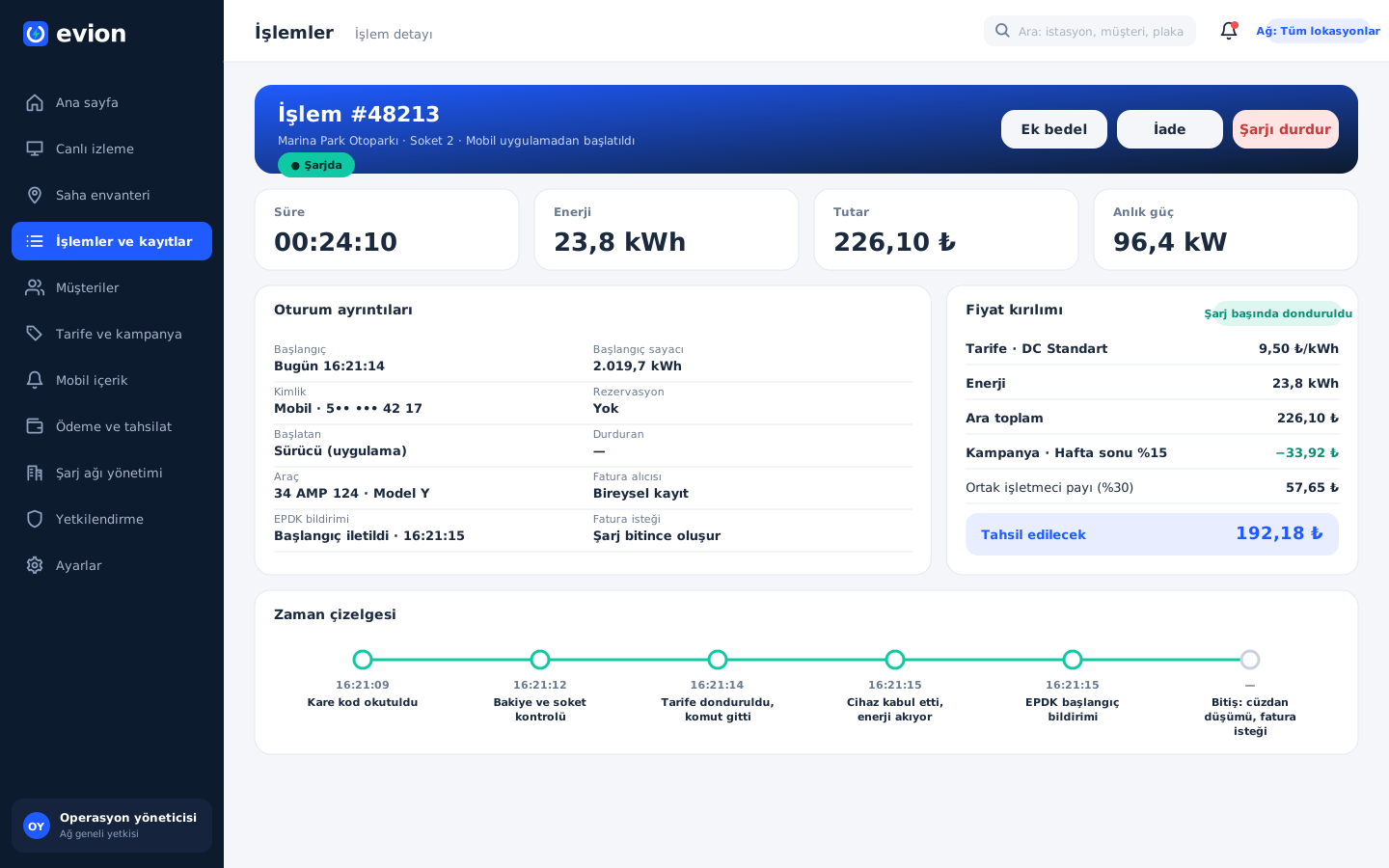
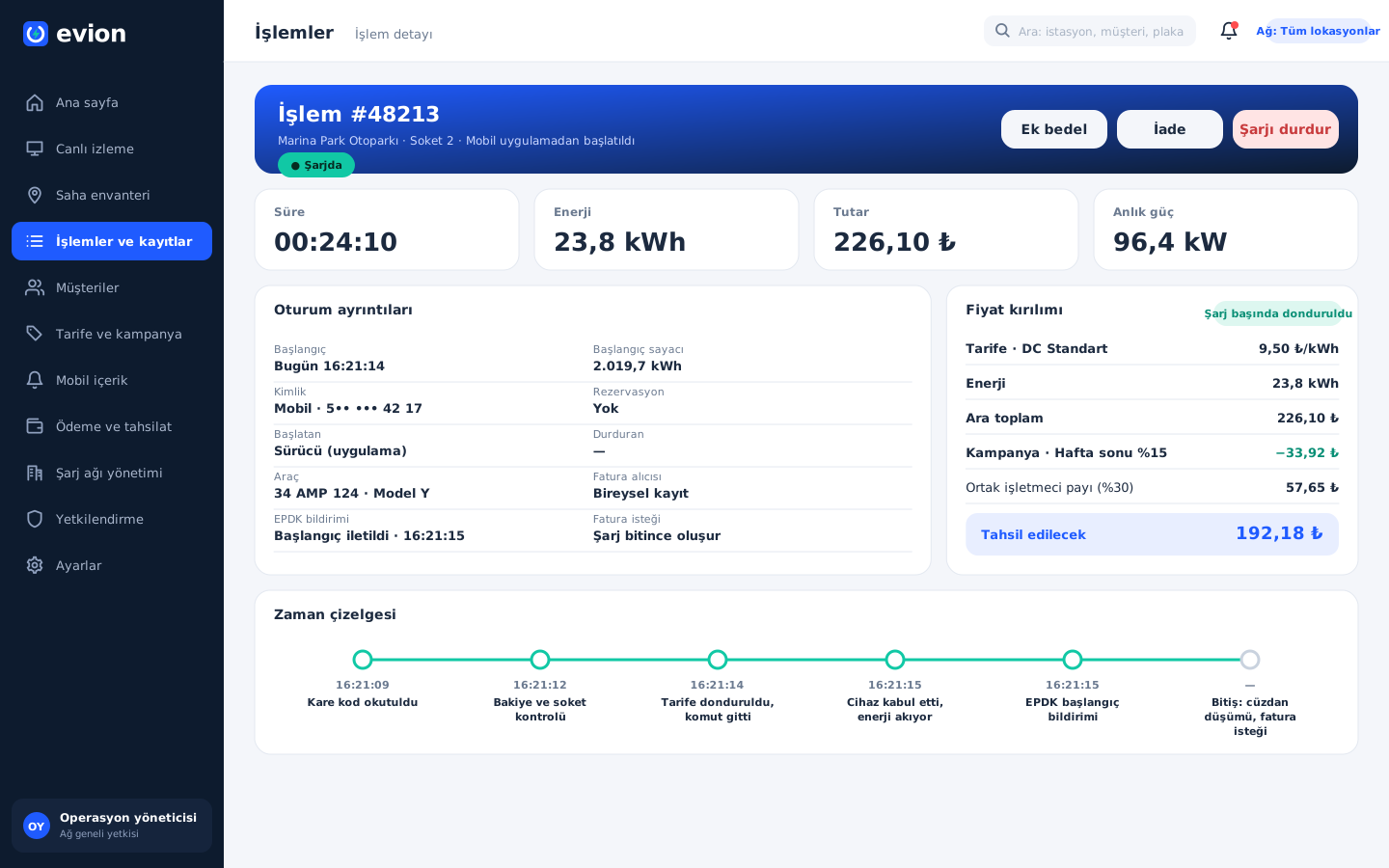
This page shows the record of a single charge in full: a summary of duration, energy, amount and current power, session details, and the breakdown of the tariff, promotion and revenue share frozen at the start of the charge. The timeline below lists every step, from scanning the QR code to the invoice request, with its time; the support team also processes refunds and additional charges from here.

Transaction record and price breakdown

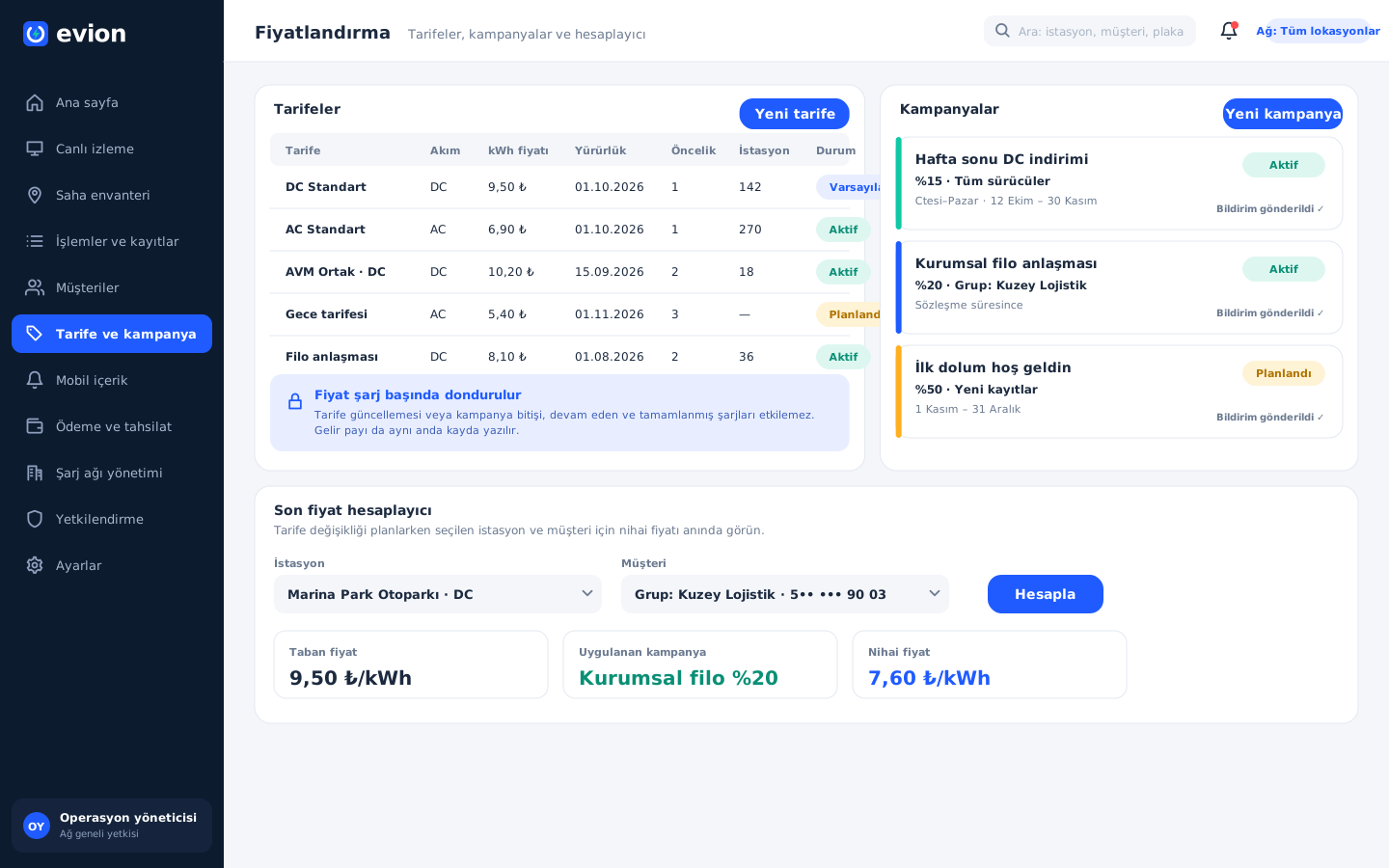
Tariff and promotion management

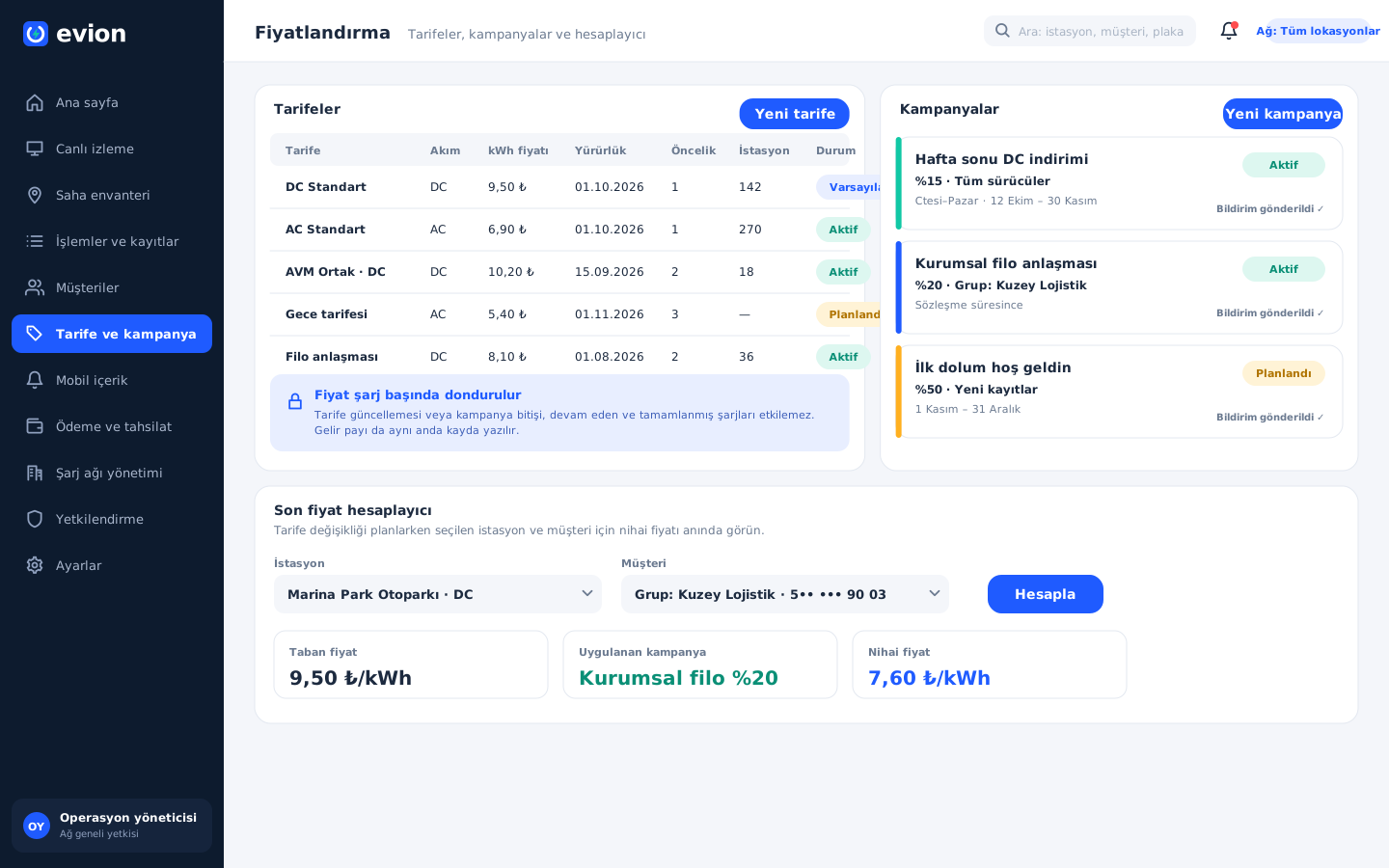
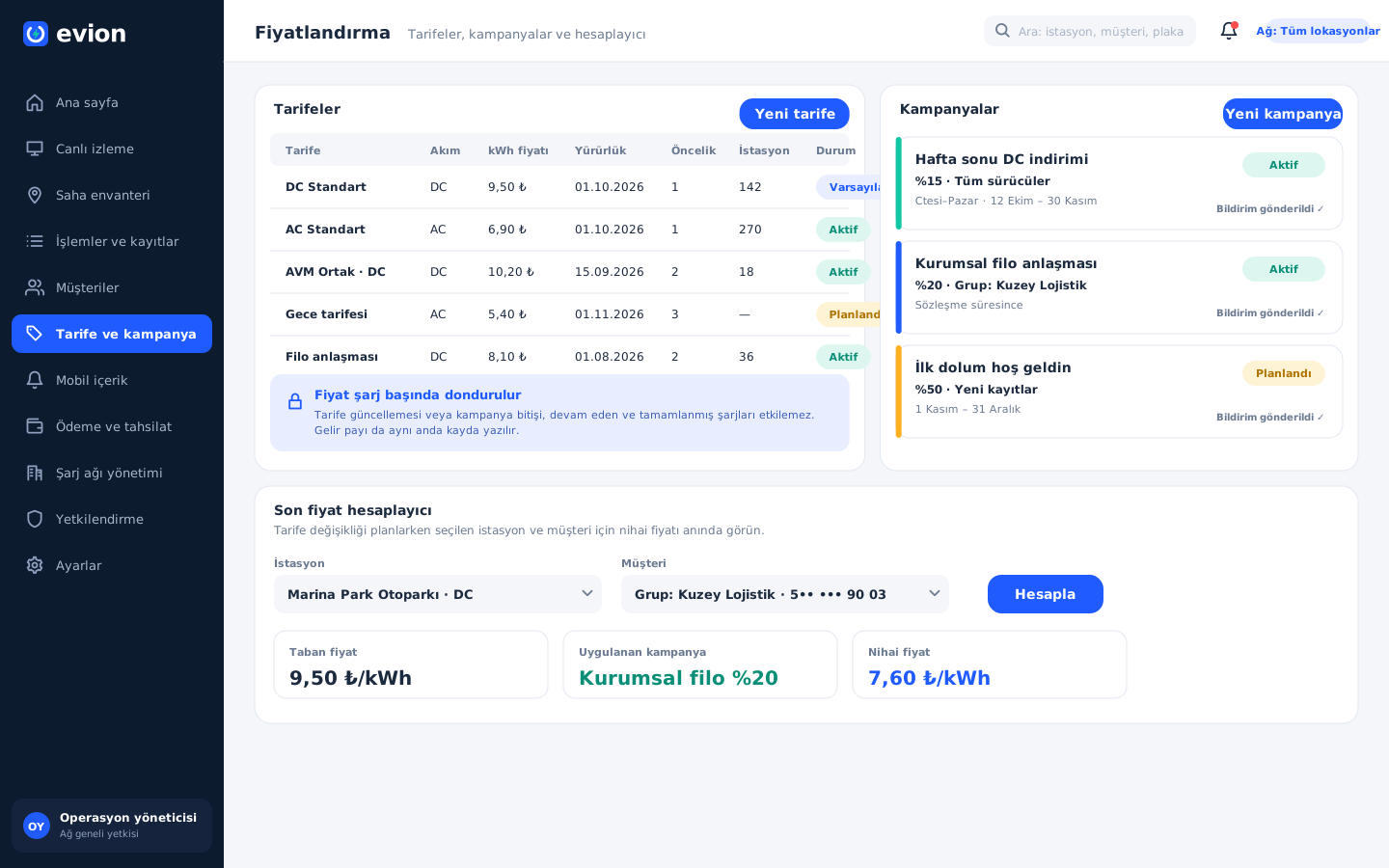
The operations team defines tariffs by price per kilowatt-hour, current type, effective date and priority, and makes one of them the default. Promotions apply a percentage discount to all drivers or to selected customer groups. The final price calculator shows the base price, the discount and the final price for the selected station and customer before the tariff changes.

Tariff and promotion management

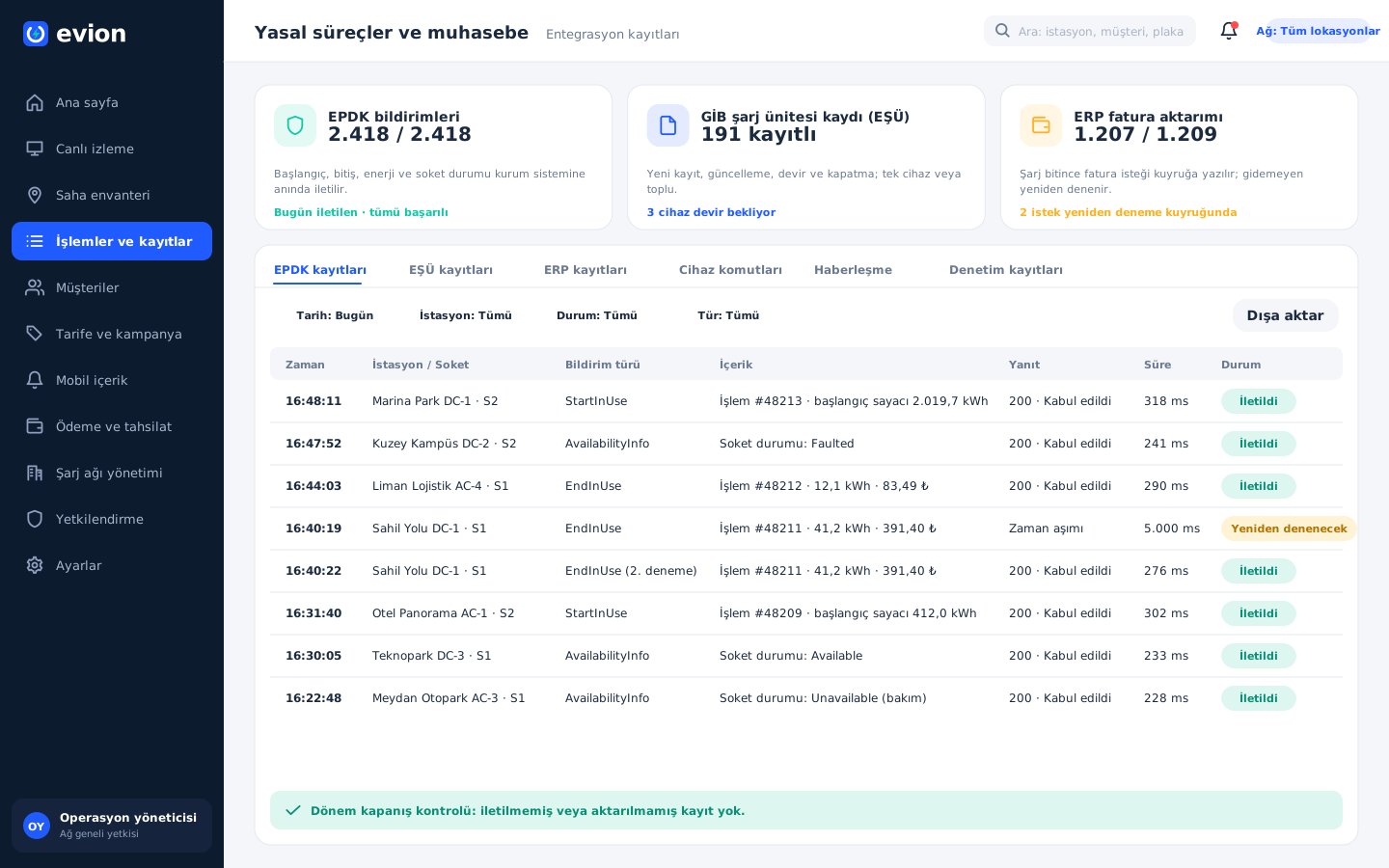
Regulatory processes and accounting

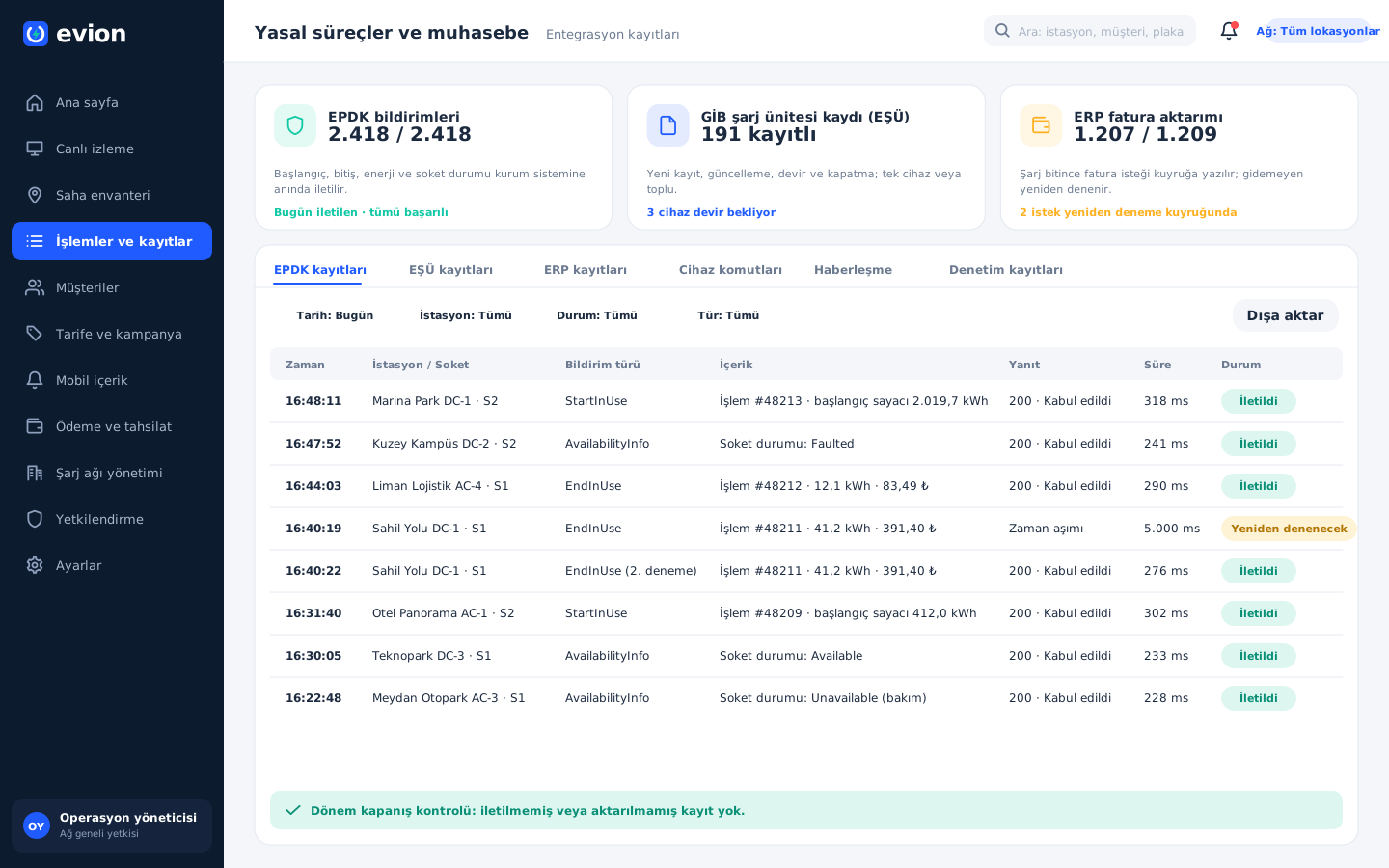
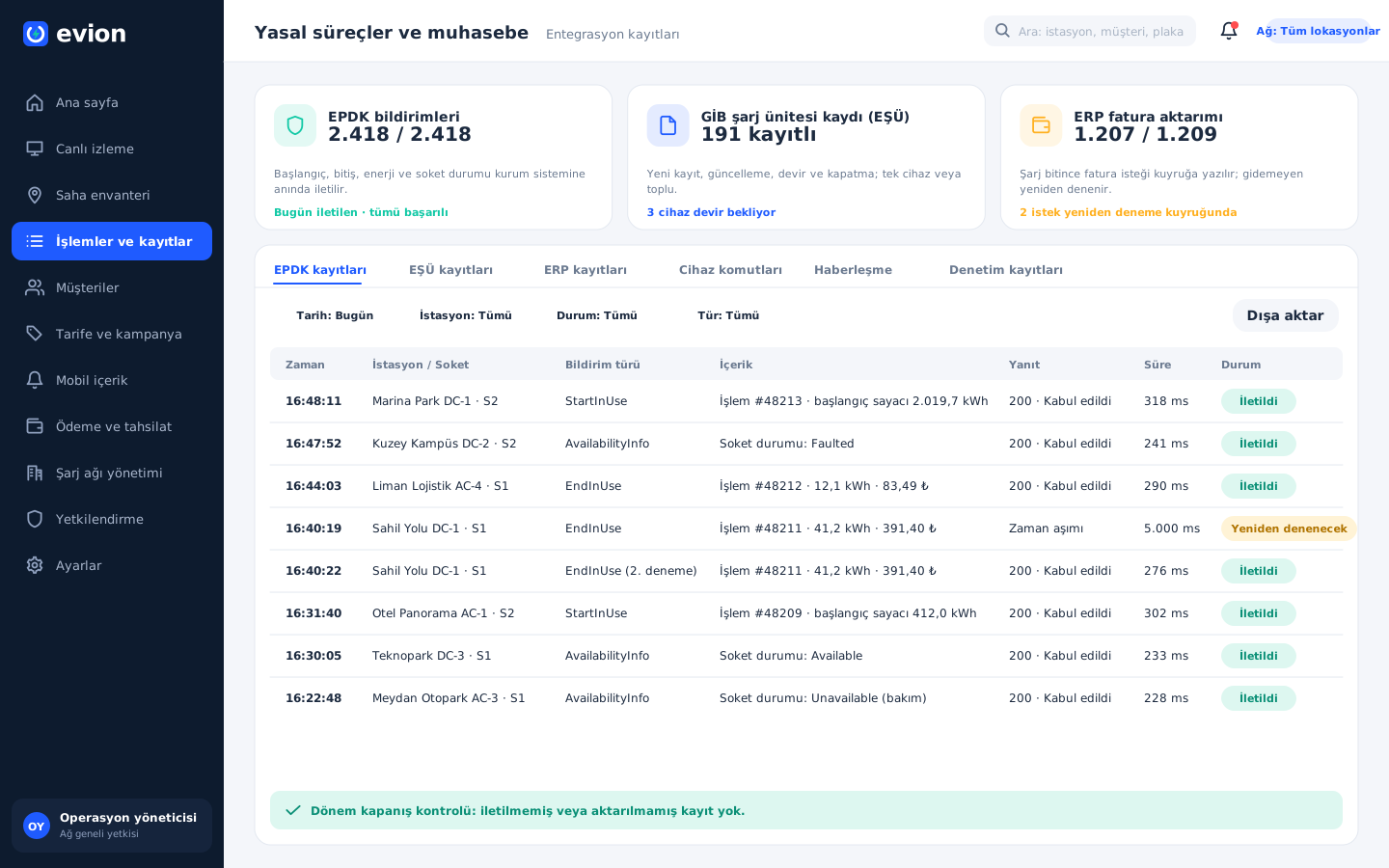
Live counters at the top of the screen summarize EPDK notifications, GİB charging unit records and ERP invoice transfers. Below, each notification's time, station, content, the response returned by the authority and its retry status are visible line by line. At period end, a single check tells whether any unsent or untransferred record remains.

Regulatory processes and accounting

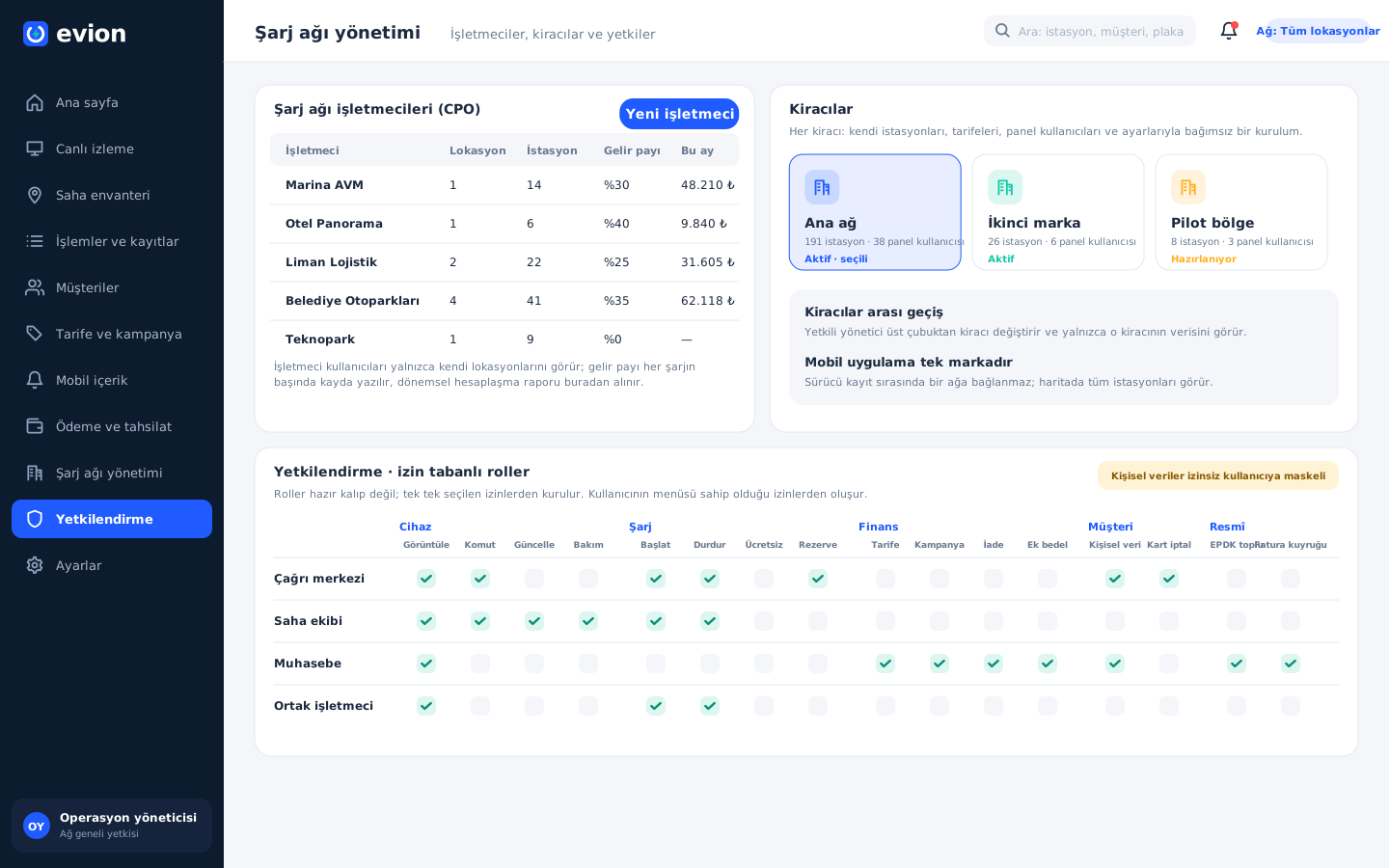
Charging network management, tenants and permissions

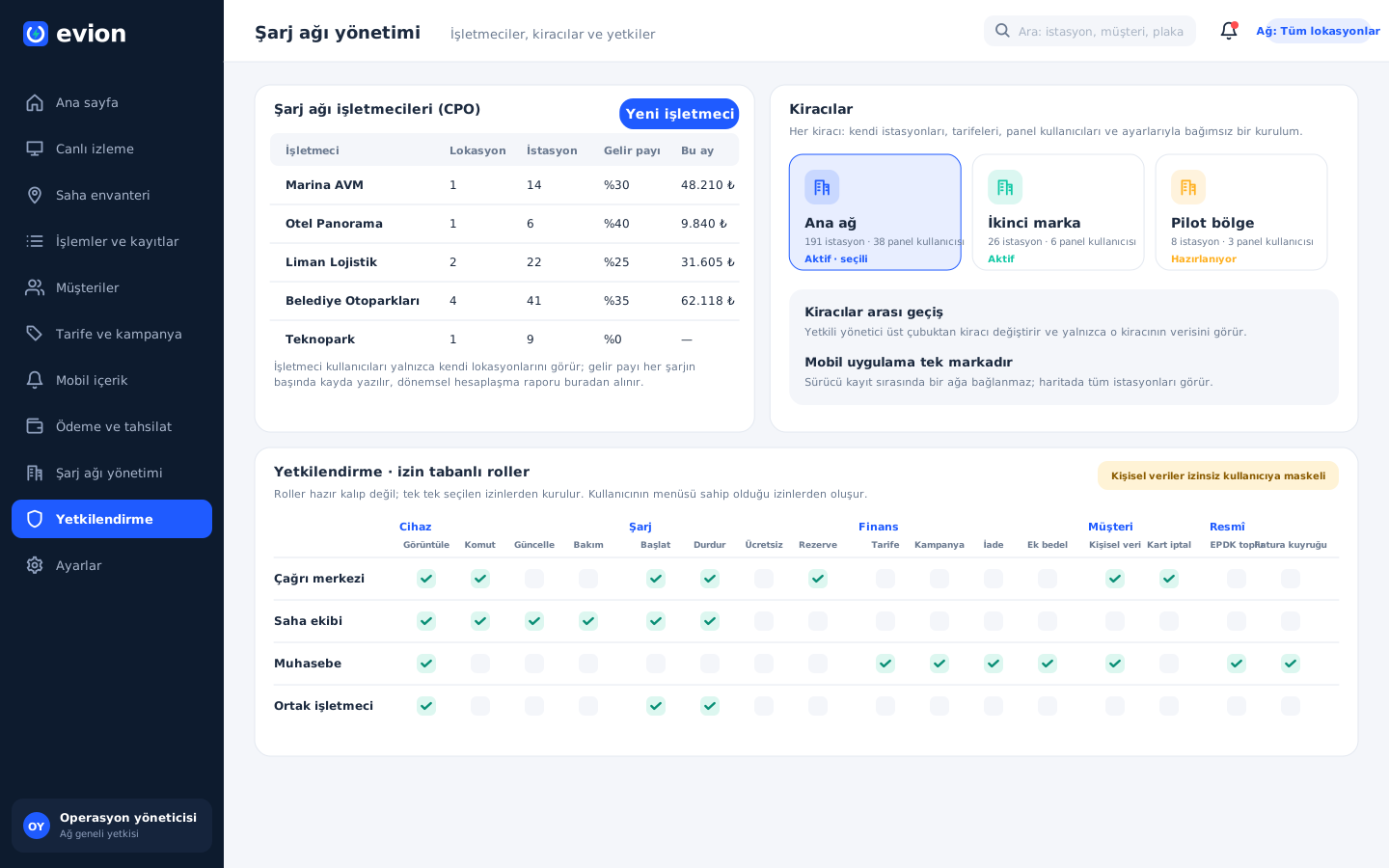
On this screen the operations team defines partner operators (CPOs) such as shopping malls, hotels or public institutions, with their locations, stations and revenue share. A second brand or a separate network on the same installation works as an independent tenant with its own data. The matrix below shows which actions the call center, field team, accounting and partner operator roles can perform.

Charging network management, tenants and permissions

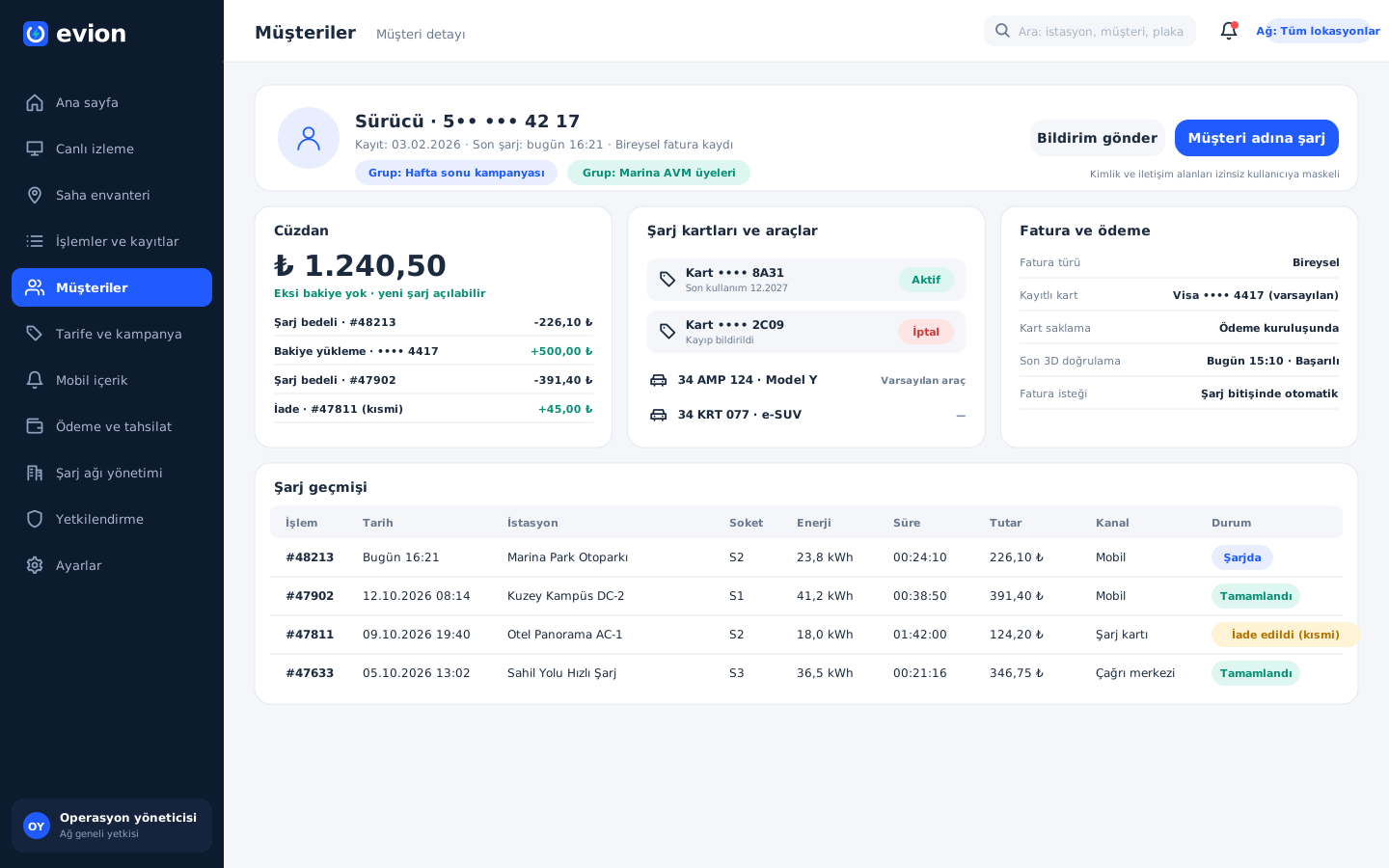
Customer detail

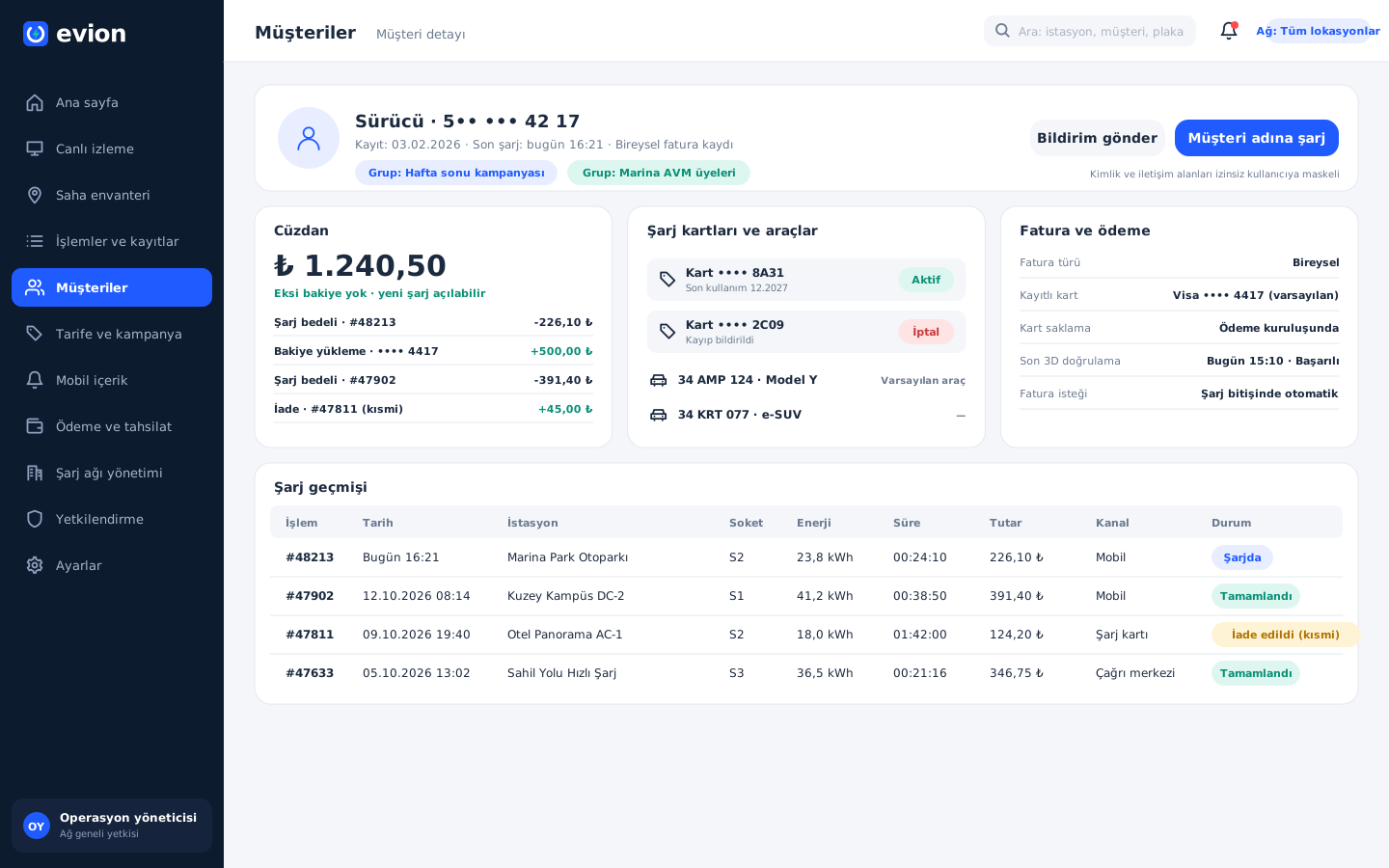
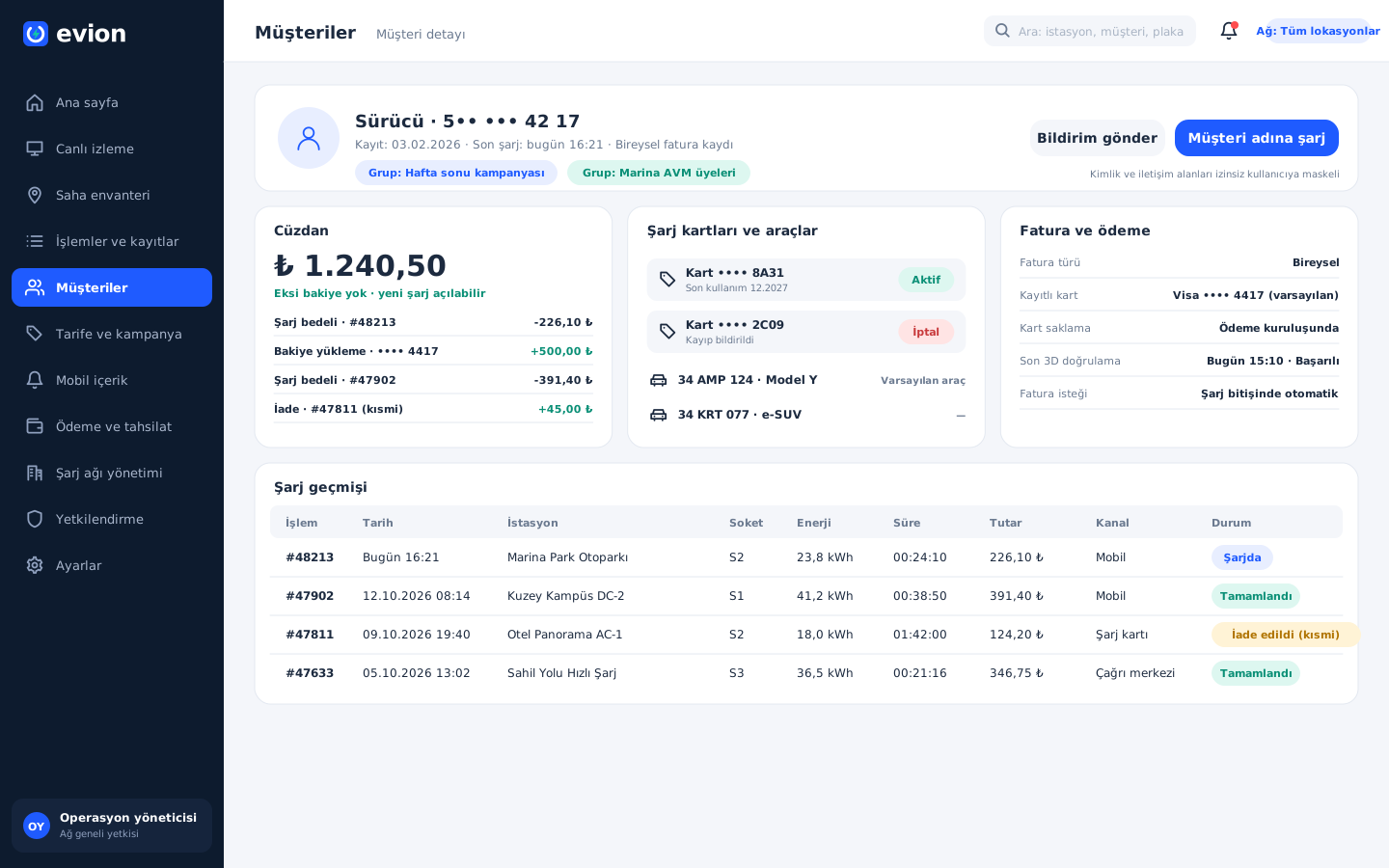
When the call center finds a driver by phone number or license plate, this screen comes up: wallet balance and transactions, charging cards, vehicles, invoice and payment details, charging history and group memberships. Starting a charge or sending a notification on behalf of a driver whose phone is off also begins from this screen.

Customer detail

Driver login and map

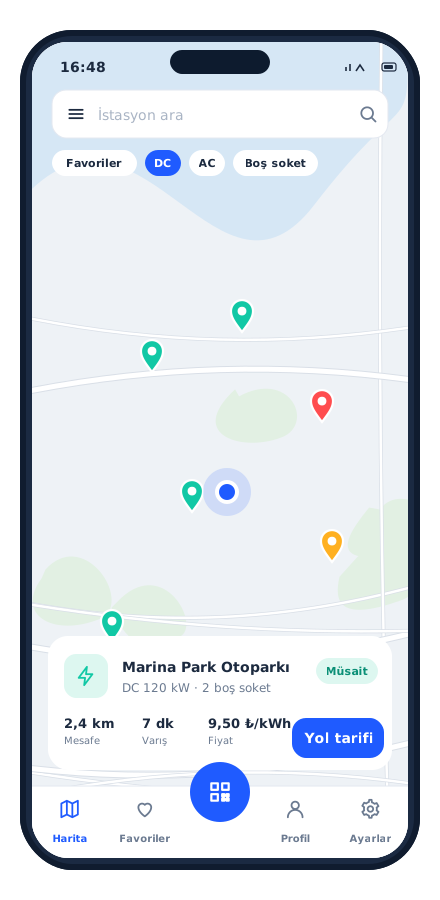
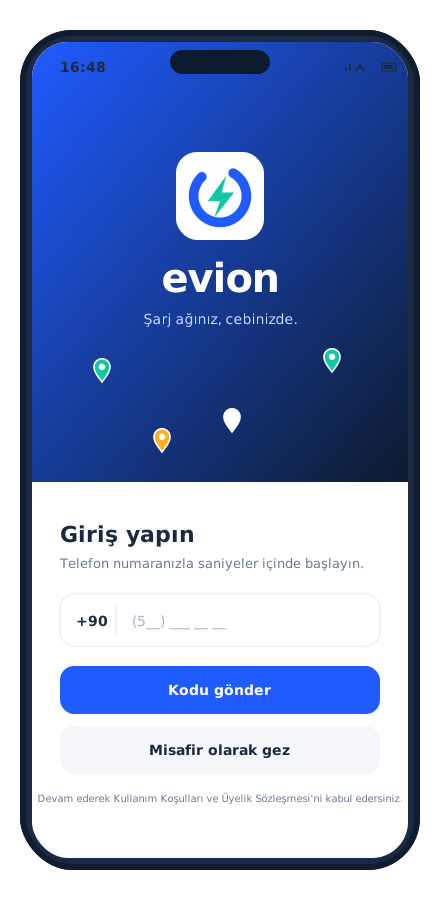
The driver signs in to the app with a phone number and a one-time password sent by SMS; there is no need to set a password, and if they wish they can browse the map as a guest. Markers on the map cluster together; DC, AC and free-connector filters bring suitable stations to the front, and the selected station's distance, travel time and price are shown; directions are handed off to the phone's map app.

Driver login and map

Station page and charging by QR code

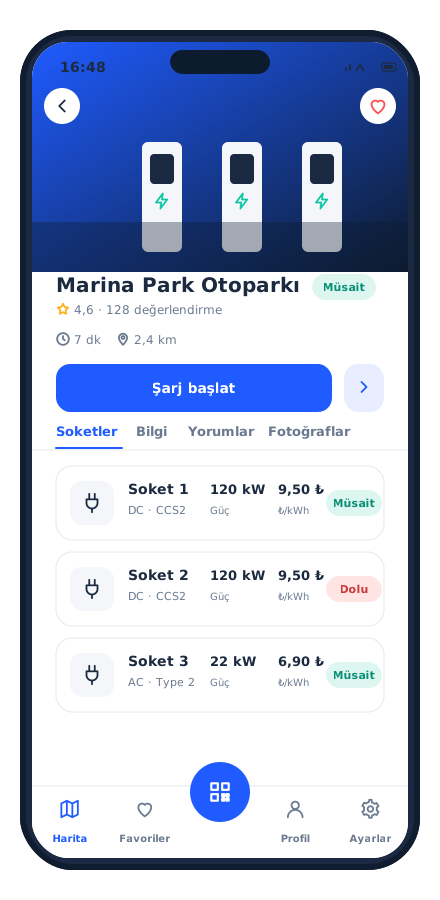
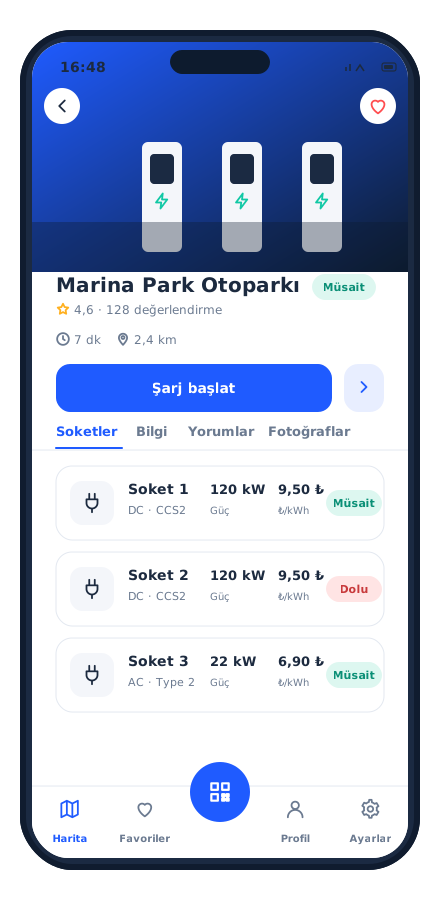
The station page shows photos, the driver rating, the distance and opening hours; each connector's power, type, price per kilowatt-hour and current status sit on a separate row. The driver plugs in the cable and scans the QR code on the connector with the camera; if the code can't be read, they type in the connector's short code by hand. Once the center has run its checks, charging starts.

Station page and charging by QR code

Live charging screen and wallet

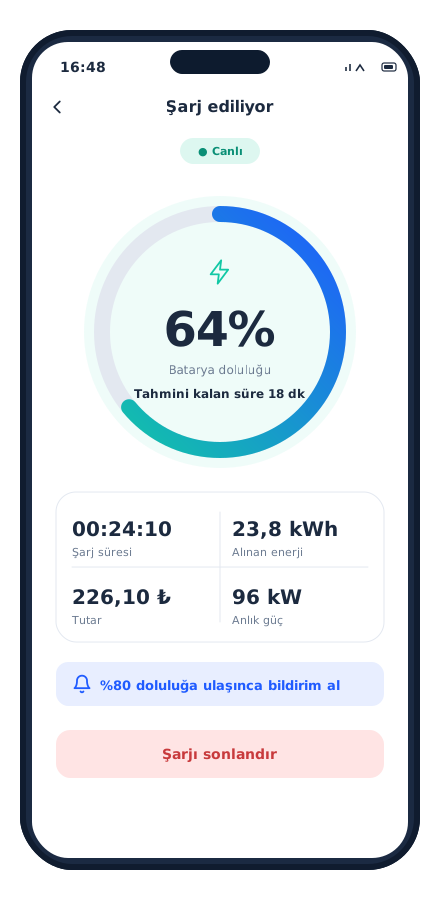
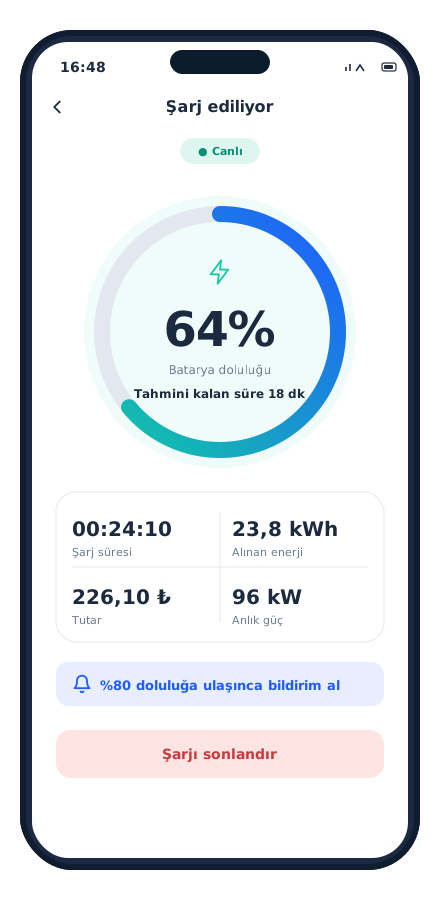
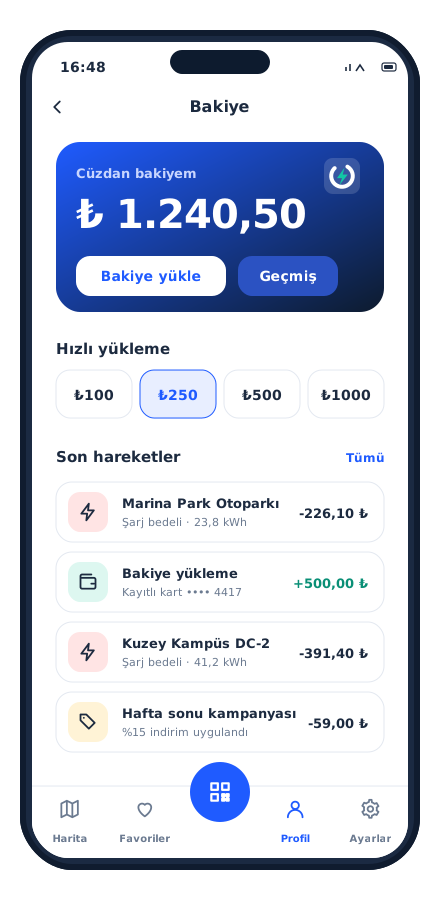
While charging, the driver follows battery level, elapsed time, energy delivered, amount and current power live; they receive a notification when the chosen charge level is reached and can stop the charge from the app. The wallet screen brings together the balance, preset top-up amounts, 3D Secure verification with a saved card and all transactions.

Live charging screen and wallet

Reservation and settings

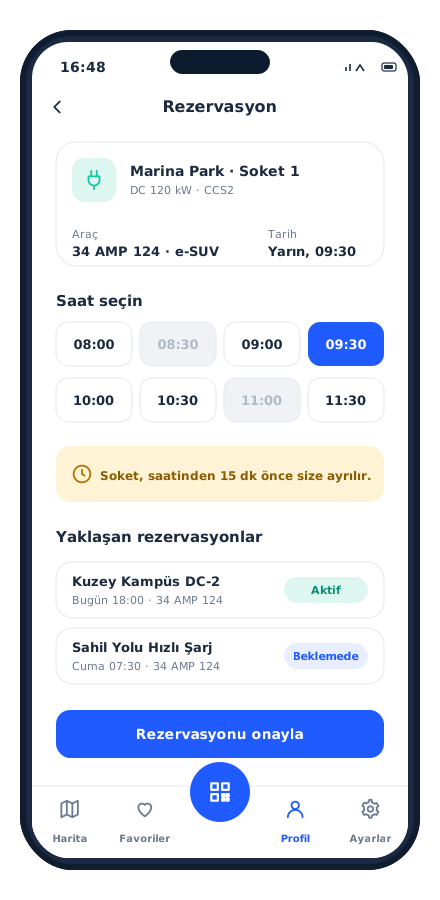
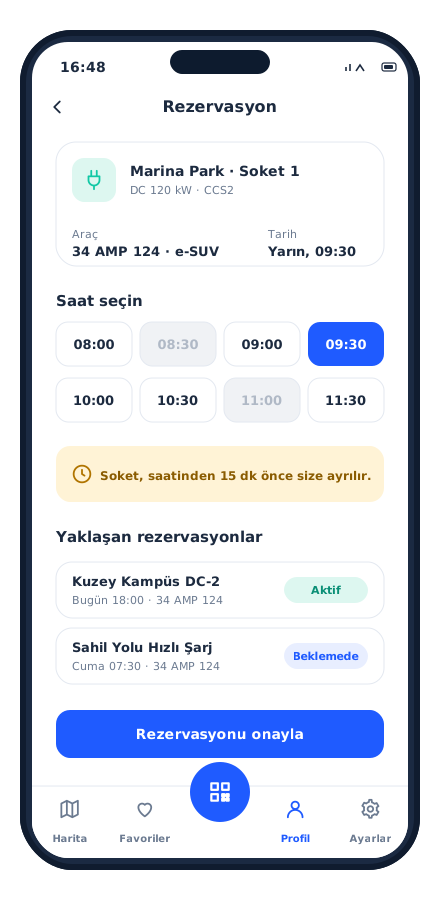
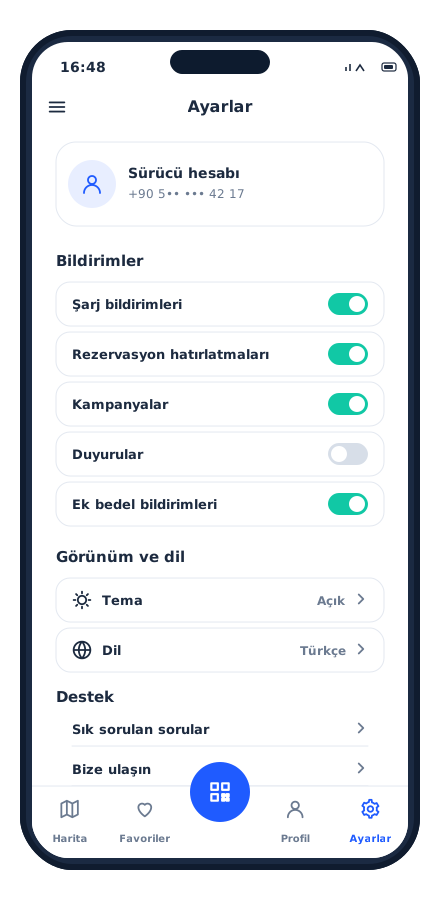
The driver reserves a connector for a later time by choosing the date, time and vehicle; if there is no conflict the reservation is created, and a reminder arrives 15 minutes before the start. Upcoming reservations are listed with their status. In settings, charging, reservation, promotion, announcement and additional-charge notifications can be turned on and off individually; theme, language, FAQ and contact are also there.

Reservation and settings
Mobile App

A powerful mobile app, always at hand

Instant notifications and alerts, quick actions and live data: users and field teams get their work done from their phones, without waiting.

Features

Key features of the project

Brand-independent charger support

Brand-independent charger support

Any charger that speaks OCPP 1.6 or 2.0.1 can be connected; the only verifiable question at procurement becomes “does the charger support OCPP?”. The network can be renewed in stages.

Price is frozen at the start of the charge

Price is frozen at the start of the charge

The tariff, discount and revenue share are written to the record at the moment the charge starts; later changes do not affect an ongoing charge.

An outage does not create unbilled energy

An outage does not create unbilled energy

On a charger that loses its connection, the charge is closed at the last meter value and billed; an inconsistent meter value is not passed on to the customer as a wrong amount.

Wallet first, then charge

Wallet first, then charge

Because deducting from the balance does not depend on an external system, it completes under all conditions; the outstanding amount is limited to at most one charge's fee. The card number is not stored on the platform.

A charge can start from three channels

A charge can start from three channels

Phone, charging card or call center; the same rule, the same record and the same audit trail for all three.

Remote intervention

Remote intervention

Restart, cable unlock, connector disable, power limit, software update and diagnostics file request; bulk actions at the same location. Site visits are left only for physical problems.

Fault detection does not depend on customer complaints

Fault detection does not depend on customer complaints

Chargers that report a fault or send no signal are collected in a separate list; the map color changes instantly.

Regulatory processes run automatically

Regulatory processes run automatically

The EPDK notification, the GİB charging unit registration and the invoice request are triggered by the charging event; with a queue, retries and duplicate prevention, no record is left missing at period close.

Partner operators and revenue sharing

Partner operators and revenue sharing

A shopping mall, hotel, fuel station or public institution is defined as an operator; locations are linked, the revenue share is written to the record at the start of the charge, and periodic settlement is taken from the report.

Multi-tenant architecture

Multi-tenant architecture

A new tenant works like an independent installation with its own stations, tariffs and users; no redevelopment is needed for a second brand or a separate network.

Permission-based authorization and data masking

Permission-based authorization and data masking

Roles are built from individually selected permissions; phone, ID, tax and card fields are shown masked to users without permission.

Reservation

Reservation

A connector is reserved for a specific driver for a later time; a reminder 15 minutes before, and automatic release when the time expires.

Mobile content managed from the panel

Mobile content managed from the panel

Announcements, promotions, FAQ and fixed fields go live the moment they are saved; no new version of the app is needed.

Targeted notifications and promotions

Targeted notifications and promotions

Promotions, announcements and notifications through customer groups; corporate discounts are attached to a group without changing the tariff.

Full audit trail

Full audit trail

Free charges, commands, refunds, wallet corrections and tariff changes are recorded per user; used for disputes and internal control.

Keep scrolling

Project presentation

Presentation

Move between slides with the arrow keys or by swiping.

Full screen (opens in a new tab)

How we work

Your project could be next

This project was run on the same four principles; yours will be too.

  1. We start with analysis

    Scope, integrations and roadmap are written down and agreed in the first weeks; no surprises along the way.

  2. We don't touch your existing systems

    ERP, accounting, banking, e-invoicing: whatever you run, we integrate on top of it and your data stays where it is.

  3. Security is designed in from day one

    Role-based access, two-factor authentication, data-protection compliance and a log of every action are built into the foundation, not bolted on later.

  4. We're still here after go-live

    Maintenance, monitoring and new releases come from the team that built the project; someone who knows your system is always a call away.